Tools That Generate Both Training Videos and SOPs From a Single Recording
Eliminate video and SOP redundancy by generating both from a single recording.
Tools that generate both training videos and SOPs from a single recording remove the need to produce the same procedure twice. For software teams shipping frequent UI changes, the key capability is shared, editable steps, so the changed clip can be replaced without reshooting the whole walkthrough. The strongest workflows keep the video, written procedure, and translations synchronized as the product changes.
Why treating video and documentation as separate workflows creates redundant work
A subject-matter expert records a process walkthrough, then sits down again to write out the same procedure. The knowledge has already been captured once. Yet the written version still needs its own step descriptions, screenshots, and formatting because the video editor and document authoring tool treat it as a separate project. This redundancy stems from the systems the teams use. The workflows were built when video production and document authoring required different skills and tools.
Raw video does not provide the searchable, discrete, version-controlled steps that make a procedure easy to consult or audit. A text-only SOP lays out the steps, but employees may skim it and still need to watch a colleague who knows how to do the task. Teams therefore have good reasons to produce both. The waste comes from rebuilding the procedure for each format, then maintaining two independent accounts of how the software works.
How single-recording tools actually generate both a video and a structured SOP at once
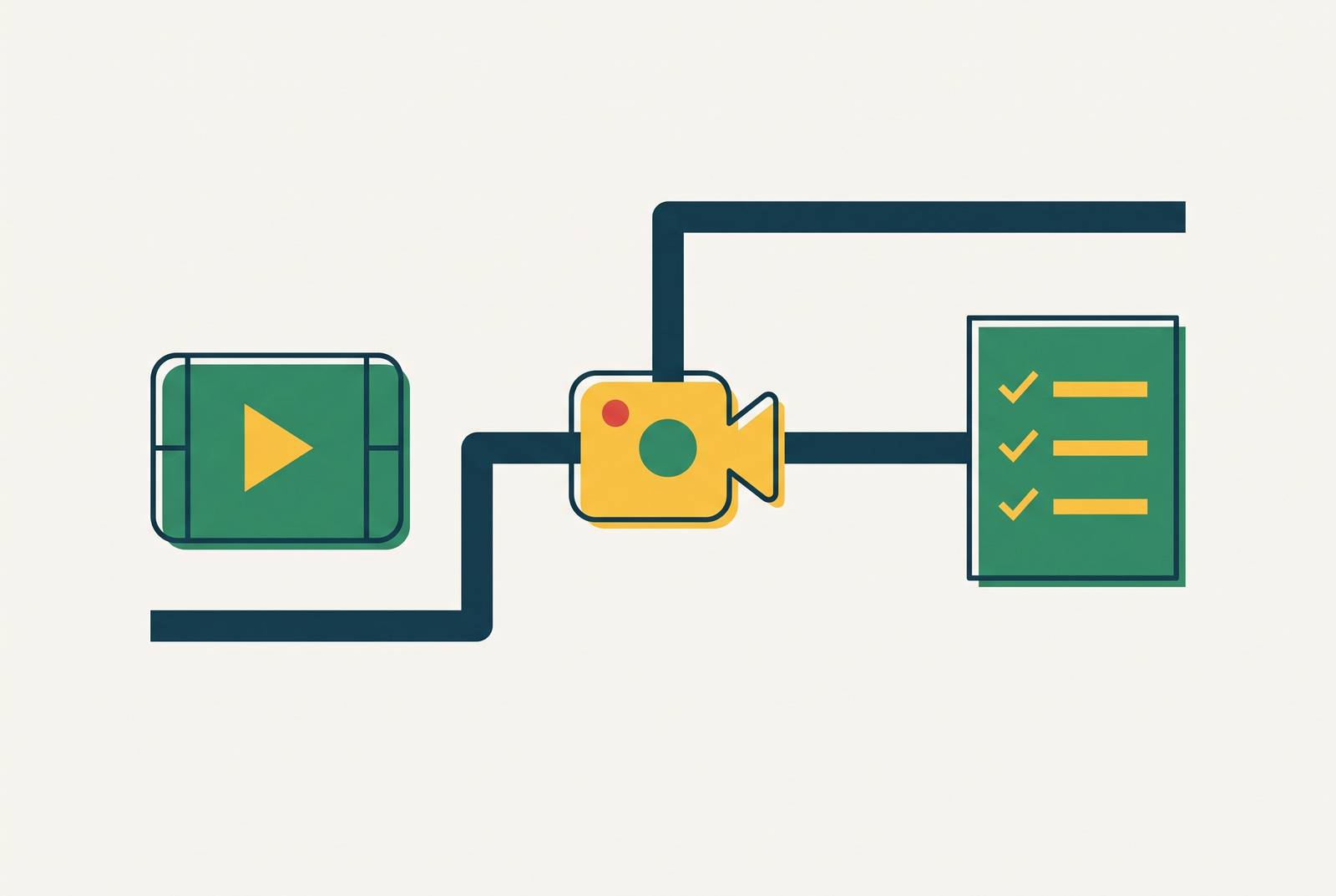
Single-recording tools treat a screen capture as a workflow. They combine speech-to-text transcription with visual analysis to identify actions such as opening a new screen, clicking a button, or describing a task. The tools use those signals to split the recording into steps. The same parsed steps then supply both the edited video and the written SOP, rather than leaving someone to reconstruct the sequence by watching the footage.
The capture itself can follow two routes. In the human-led route, a subject-matter expert records the screen while narrating, then uploads the recording for processing. In the agentic route, an AI Recorder takes a plain-language description, performs the flow in a real browser, and records the run. That run supplies the video, step screenshots, and written procedure. For routine procedures, this can remove the expert from the recording step, though it does not remove the need to review the result.
Why not just upload the recording to general-purpose AI? A text summary is not a maintained procedure. File-size limits can obstruct full recordings, independent uploads can produce inconsistent terminology, and a chat response does not supply the same step-level screenshot extraction, versioning, or compliance workflow. Tools built for this work fill those gaps with features such as terminology memory, step-level version control, and built-in distribution. Those capabilities turn a one-time conversion into something a team can edit and maintain.
What the output actually looks like: video elements versus SOP elements from the same source
A single ten-minute screen recording can yield a video with AI voiceover, automatic zooms, spotlights on clicked elements, captions, branded templates, and chapter markers aligned to the detected steps. The voiceover can replace or supplement the original narration. On the document side, the same recording supplies step titles, descriptions, and an extracted screenshot or short clip for each action. The resulting SOP has structure ready for a knowledge base or PDF export. These are distinct assets.
Their shared step structure is the important connection. In a workflow that supports linked edits, a single edit to a step propagates to both outputs. Learners can then choose the format that suits the task, watching the action or reading the instructions while they work. Translation extends that choice across languages. The same source can yield versions with voice and captions without anyone having to record again.
A subject-matter expert still needs to confirm that the generated script preserves the meaning of the approved procedure, especially when compliance is involved. With that review built in, an expert recording on Tuesday could give L&D a polished video, written SOP, and translated versions by Wednesday. That illustrates a possible pace of production. Generating the formats together saves the time required to schedule them as successive projects.
The tools that currently deliver genuine dual output from a screen recording
Vidocu fits teams that want a video and written guide from either a human recording or an automated browser run. It takes a screen recording, or a plain-language flow description through its AI Recorder, and returns a video, step screenshots, and a written article from one run. It also creates subtitles, has optional AI voiceover, and translates the results into 65+ languages. A free tier is available.
The automated route distinguishes capture from editing. A team with an existing recording can use that footage, while a team documenting a routine browser flow can start with a description instead. Both routes aim at the same paired result. That is more specific than a tool that only summarizes a video or only polishes its presentation. The defining capability is generating the procedure and the video from one run.
That said, dual generation does not establish every maintenance capability a buyer may need. The features described here do not, by themselves, demonstrate step-level replacement, approval history, or synchronized updates across every translated asset. Those are separate evaluation questions. For teams whose main problem is keeping tutorials current through rapid releases, initial output quality is only part of the decision. The update workflow deserves equal scrutiny.
What to look for when evaluating these tools — the criteria that actually separate them
Step-detection quality is the first test because every output depends on it. Even with a polished video, an SOP can still group actions that do not belong together or leave out a required step. Teams should test how well the tool splits their footage into steps and whether editors can split, merge, reorder, and rewrite the results. The first pass needs to be editable. Each step should also include a screenshot or short clip so the written guide shows what correct execution looks like.
That test needs to use the kinds of input the team works with. Clean screen captures, archival video, phone footage from the floor, and an automated browser run are different inputs. A screen-only tool may work for software training but fall short for a team that teaches physical processes. Can an editor replace an affected clip or step after a UI change without rebuilding the video and SOP, and does the tool preserve step-level history?
Distribution needs the same practical examination. PDF, Markdown, HTML, knowledge base integration, and LMS/SCORM compatibility serve different destinations, so the useful option is the one that reaches the existing audience. Translation also needs more than a language count. Global teams should test what the tool produces because one-click translation, context-aware re-voicing, and manual language review each do different things. Finally, pricing needs to fit production volume, including concurrent users, seat limits, and output caps that could constrain a ten-person team.
Where human review remains non-negotiable even with AI-generated output
AI can shorten dense passages, reorganize instructions, and generate fluent narration without knowing whether the result preserves the approved procedure. Clear wording is not proof of correctness. A subject-matter expert must judge that, and teams working on compliance-sensitive, regulated, or safety-critical procedures need to plan time for that review when they make the content.
The practical response is a final approval gate. Tools with approval workflows and audit trails can reduce the burden by keeping review within the production workflow rather than treating each upload as an independent exchange. The review still belongs to a person. The review confirms meaning after the tool has handled transcription, screenshot extraction, and formatting.
There is also a boundary between documentation and training. Trainual distinguishes a recorded guide from training and accountability, which can require a management or LMS layer for completion tracking and assessment. A generated video and SOP do not automatically close that loop. Teams that need evidence of completion still need a way to collect it. Even with these responsibilities retained, reviewing a paired draft adds far less production work than independently building and maintaining both formats.
How do software teams keep training videos current without reshooting the whole walkthrough?
When the product changes, shared source steps let a team replace the affected clip or instruction. Where the tool supports synchronized updates, the replacement flows into the video, SOP, and translated versions. The unchanged steps stay in place. This is the central maintenance advantage for software that ships UI updates every two weeks. This maintenance advantage requires editable, linked steps.
The traditional workflow makes that distinction easy to see. A UI change sends an editor back into the video project and a document author back into the SOP, with language versions adding more separate updates. A single-source workflow reduces those parallel jobs to a shared change. That reduces the opportunity for one format to lag behind another.
To make that workflow practical, teams should split recordings before upload and keep one procedure per file. A 45-minute recording that covers three different tasks is too much to keep up to date as one file. A granular source makes extraction cleaner and step-level replacement more workable, while a monolithic recording can turn a small change into a full rebuild. Teams should get into this habit before they build a large library.
Replacing a clip does not prove that the revised instruction preserves the procedure's meaning. Accountability remains necessary as the scope of production work shrinks. With a granular source and linked outputs, each future release requires fewer resources to keep the formats and languages synchronized.
The business case for dual-output workflows in customer education and internal L&D
The business case starts with production time but extends to what usable training enables. Research on customer education links formal programs with more revenue, more product adoption among trained users, greater satisfaction, and lower support costs. Achieving those outcomes requires customer education beyond the purchase of a generation tool. Dual-output production helps make that education feasible at scale. It reduces the work required to give customers both a demonstration and a reference they can return to.
For internal L&D, the paired formats address different needs. Video-based instruction often helps employees understand and remember more than text alone does, while the SOP gives them steps to check as they do the task. Localized versions give global audiences the same choice, and training in their own language can help them adopt the product faster and need less support. At scale, repeatedly recording narration for each language makes that coverage harder to maintain.
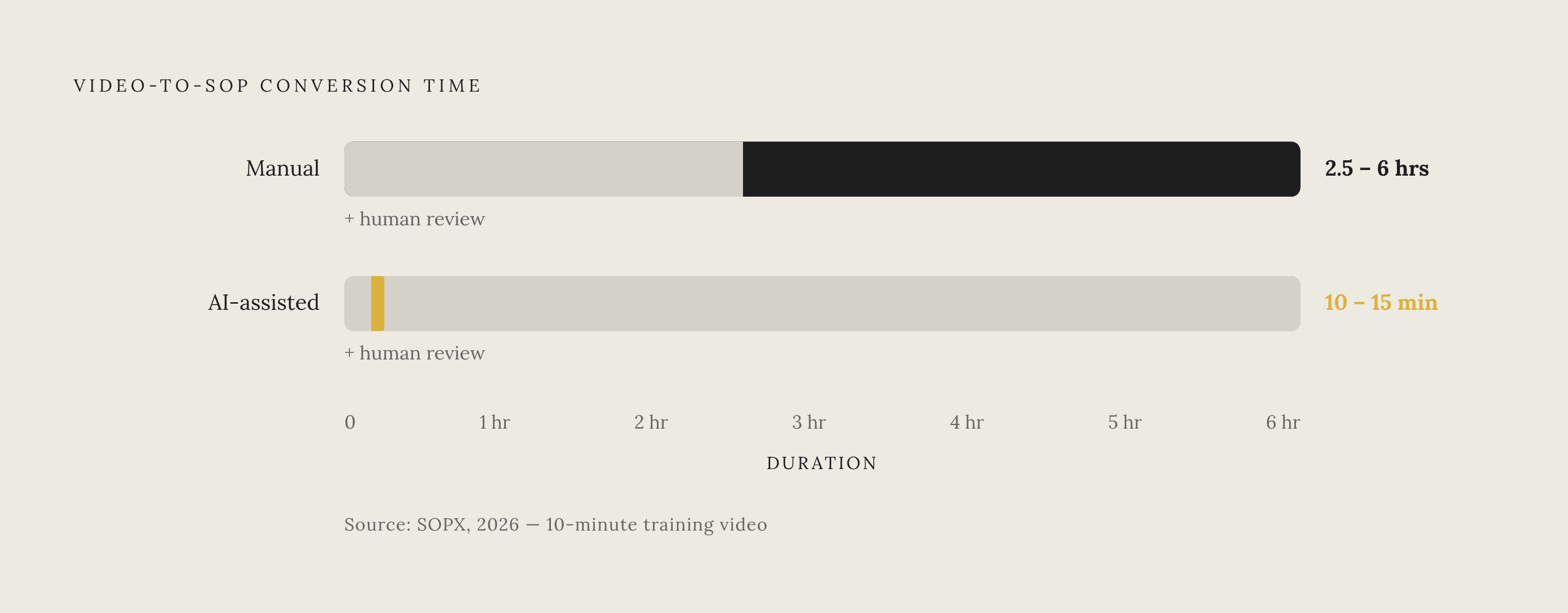
SOPX's 2026 analysis puts manual conversion of a ten-minute video into an SOP at 2.5 to 6 hours, compared with 10 to 15 minutes using AI-assisted tools. Human review remains additional work, but the comparison shows how much routine conversion can shrink. AI video production also compresses workflows that previously involved scheduling experts, booking studios, and weeks of editing. This compression leaves more room for review, updates, and localization within the content workflow.
When a procedure shares its source across video, text, and languages, the team has fewer separate assets to bring into line after the next release. Teams investing in single-recording dual-output workflows are building a content production system that can keep pace with the product.