LMS Integration Requirements for Training Video Platforms
Video management platforms need deep LMS integration to track completion, not just host the files.
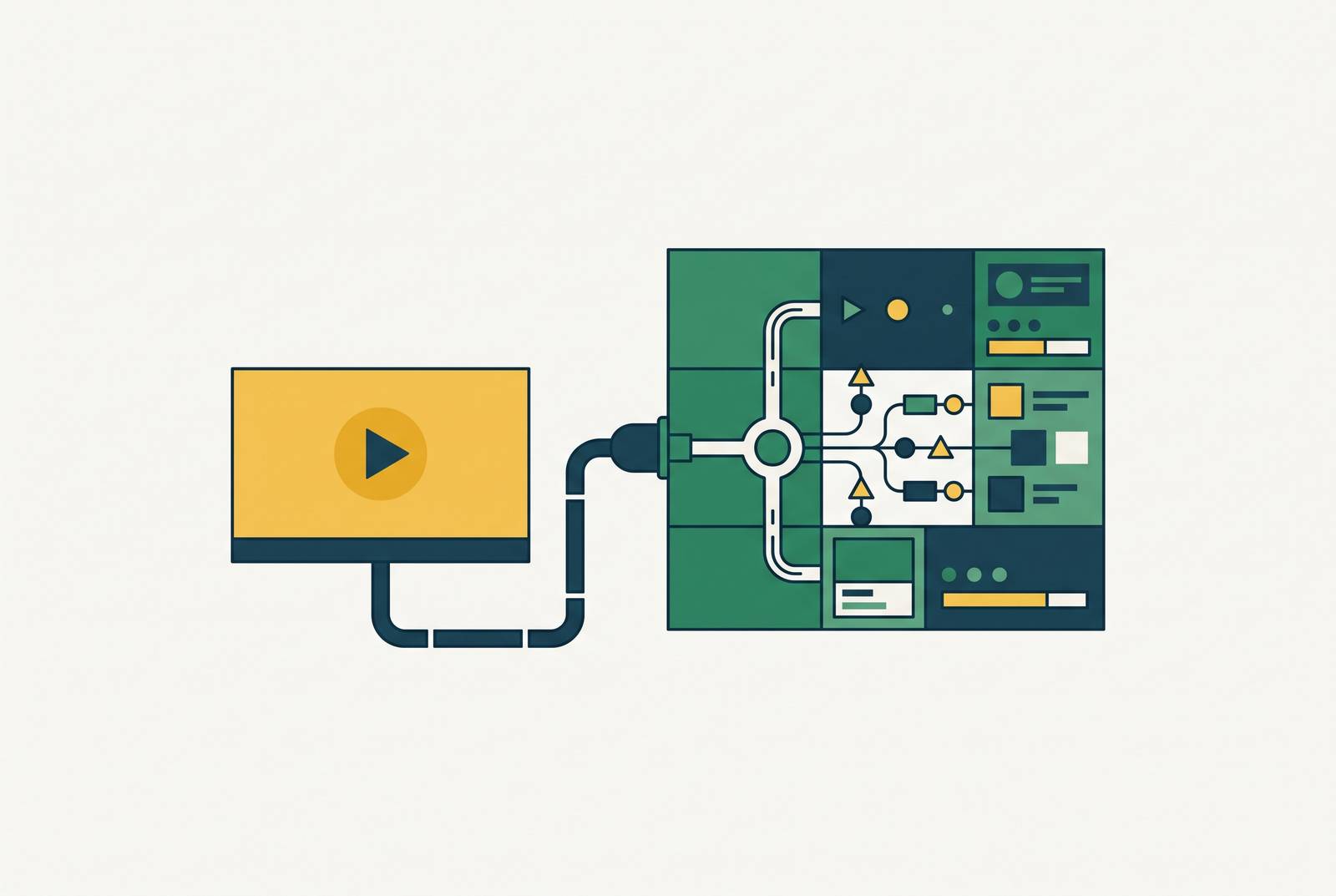
Most training teams pick a video platform the way they'd pick a camera: based on how good the final footage looks. That's the wrong test. Video creation and video delivery with accountability are two separate disciplines, and a tool that excels at the first can fail completely at the second. Panopto's 2026 guide draws a clean line between the two categories: video management platforms store, organize, secure, and track content at scale, while video creation tools simply produce the asset. Picking the wrong type of platform for the job, the guide notes, is a common mistake, and it becomes visible only after content is already built, when someone asks where it lives, who's watched it, and whether they understood it.
A creation tool built for recording or generating video usually has limited or no LMS integration, at best basic completion tracking, and thin library management. The video itself might be well made, but it still needs a home. A real home means people can find the right video among hundreds of others, watch it start to finish, demonstrate they understood it, and have all of that recorded automatically in the LMS. None of that is a production problem. It's an infrastructure problem, and it's the one training teams routinely discover only after the content is finished.
The four-layer stack a compliant training video workflow requires
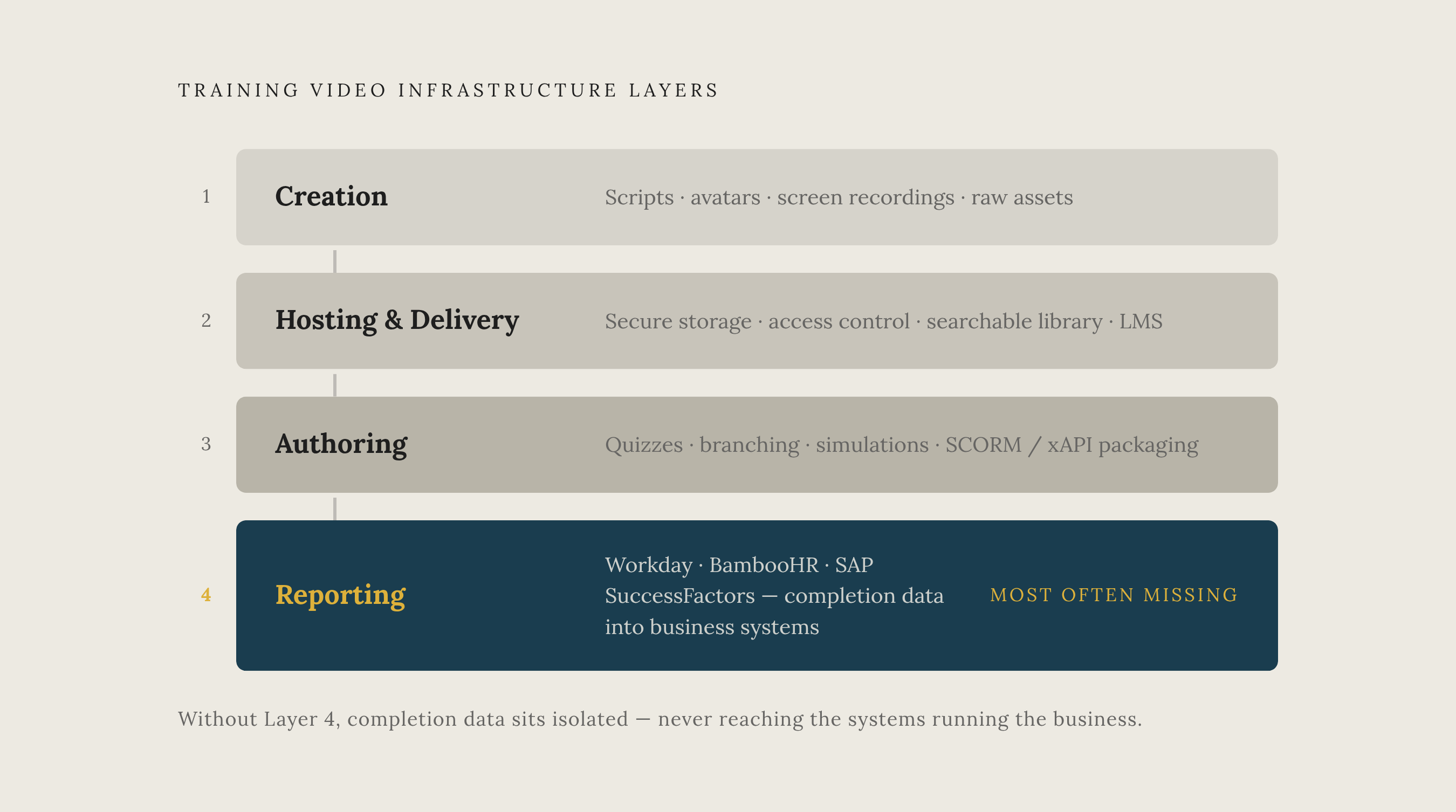
No single platform handles a compliant training video workflow end to end. It runs on four distinct layers, each doing a different job, and most selection mistakes come from treating two or more of these layers as one.
The first layer is creation: scripts get written, scenes get built, avatars or screen recordings get produced. This is where the raw asset comes into being, and buyers evaluate this layer the hardest because it is the most visible.
The second layer is hosting and delivery. Secure storage, access control, a searchable library, and reliable playback all live here. This is where the LMS itself sits, or where a dedicated video management platform sits alongside it.
The third layer is authoring. When training needs formal quizzes, branching scenarios, or simulations, a separate authoring step wraps the video in an interactive shell that can talk to the LMS. Video alone can't carry a quiz score. Something has to package the interaction and report it.
The fourth layer is reporting. When training records need to connect to HR, compliance, or quality systems, a reporting layer links the LMS to platforms like Workday, BambooHR, SAP SuccessFactors, or a CRM. If this layer is missing, completion data sits isolated in the LMS and never reaches the systems that actually run the business.
A cost risk hides in this stack because vendors rarely disclose it in their pitch decks. Hosting high-definition video directly on the LMS can trigger extra fees once data caps are exceeded, and integrations with critical software are often sold as premium add-ons rather than included in the base package. A team that only checks the sticker price on a proposal will miss this every time.
What SCORM and xAPI do, and the difference it makes to video platform requirements
SCORM and xAPI get mentioned together so often that buyers assume they're two flavors of the same thing. They solve different problems, and which one a program needs changes which video platform features actually matter.
SCORM is short for Sharable Content Object Reference Model, and it's the standard that lets online training content run across different learning platforms without being rebuilt for each one. When a video platform integrates properly with an LMS through SCORM, completion status, time spent, and quiz scores all flow straight into the LMS gradebook with no manual reporting involved.
xAPI covers more ground. SCORM works well if a course just needs to report completion, status, and quiz results back to a compatible LMS, but xAPI can capture a much wider range of learning and performance activity, including experiences that happen outside a traditional course structure. D2L's 2026 LMS comparison lists SCORM and xAPI compatibility as one of eleven features it considers non-negotiable for enterprise-grade training platforms, pointing to the role these standards play in content portability and in giving organizations detailed learner activity data across systems.
This has a direct, practical consequence for picking a video platform. A platform that exports only MP4 files can't participate in SCORM or xAPI reporting. Getting that content into a tracked, reportable format requires either a separate authoring tool to wrap the video or a platform that exports SCORM packages natively.
Localization adds another layer of difficulty here. Generating an independent SCORM package for each language, so that every localized version tracks separately inside the LMS, is something only some platforms can do. When a video platform supports localization through one-click translation across 33 or more languages, as Clueso does, the SCORM or xAPI question still has to be asked directly: does each language version get its own trackable package, or does the interactive and tracking layer stay locked in the source language while only subtitles and audio get translated? For a global training team, that distinction decides whether completion data from a localized-language rollout reaches the LMS gradebook.
The integration requirements that go beyond standards compliance
SCORM and xAPI compliance set the floor. They don't set the ceiling. A platform can pass every SCORM handoff test and still fail the organization if it can't connect to the other systems employees already rely on every day. When that happens, training teams end up running a parallel, manual workflow alongside the automated one they thought they'd bought.
Panopto's 2026 guide identifies a minimum integration surface that any serious training video platform needs to cover: LMS connectivity (Moodle, Canvas, Blackboard, D2L), an SSO provider (Okta, Azure AD), and video conferencing tools (Zoom, Teams). Without the SSO piece, IT must manage a separate login system for training content, which is exactly the kind of manual overhead integration is supposed to eliminate.
Larger deployments need a wider surface still. HRIS systems such as Workday, BambooHR, ADP, and SAP SuccessFactors need to sync learner records automatically, so new hires and role changes update training assignments without someone doing it by hand. CRM systems matter for organizations running customer or partner training. Quality management systems need to link SOPs directly to required training completion, so when a policy updates, it automatically triggers retraining and nobody has to remember to do it. Larger organizations also need calendar systems and business intelligence tools so they can report training data alongside other operational metrics.
Security is a baseline requirement underlying all of this, not a differentiator. SOC 2 Type II or ISO 27001 certification, role-based access control, GDPR compliance, audit trails, and a verified uptime SLA are the minimum expected at enterprise scale. Panopto's guide treats LMS and SCORM integration, specifically the ability for completion tracking to flow into the LMS gradebook, as the dividing line between an enterprise training platform and basic video hosting.
Accessibility belongs in this same category of non-negotiable requirements. Captions, transcripts, screen-reader support, keyboard navigation, searchable transcripts, and multilingual captioning all appear in Panopto's guide as built-in requirements, not features to be added later if budget allows.
What LMS platforms expect to receive
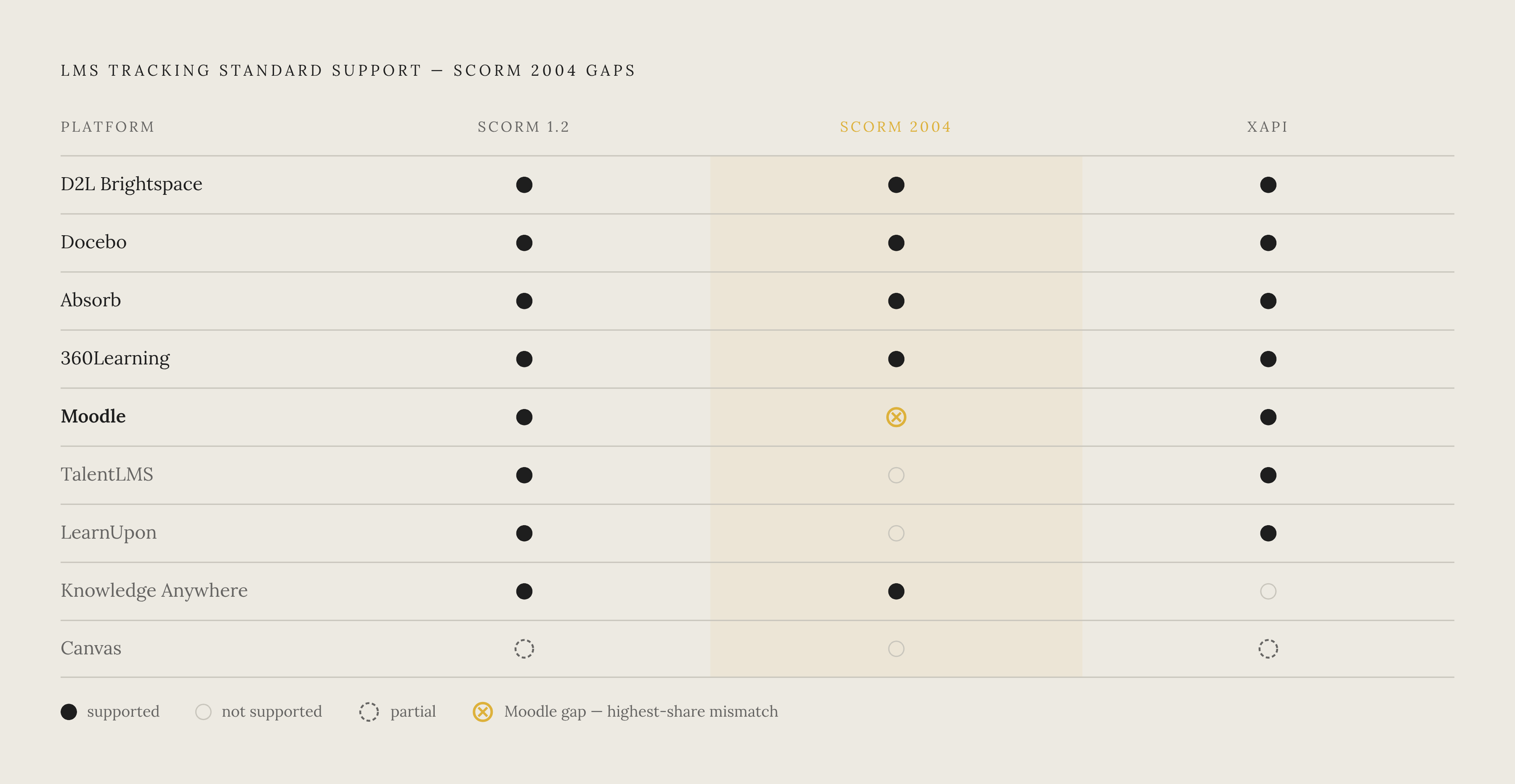
Picking a video platform means understanding the export side of the equation. Picking the right one also means understanding the receiving side: what the LMS is actually built to accept. A mismatch at that handoff point breaks the accountability chain no matter how strong either tool is on its own.
LMS platforms vary more than most buyers expect on exactly this point. D2L's 2026 comparison shows that D2L Brightspace, Docebo, and Absorb LMS all support both SCORM 1.2 and SCORM 2004, plus xAPI. Canvas, by the same comparison, supports SCORM and xAPI only partially, and D2L's 2026 tables don't confirm that Blackboard has full support across all three standards. Knowledge Anywhere supports SCORM 1.2 and 2004 but not xAPI. 360Learning supports SCORM 1.2, SCORM 2004, and xAPI. Moodle supports SCORM 1.2 and xAPI, with base support starting at Moodle 4.2, but it doesn't natively support SCORM 2004. TalentLMS supports SCORM 1.2 and xAPI but not SCORM 2004. Litmos and Absorb both support SCORM 1.2, SCORM 2004, and xAPI.
The consequence is concrete: a video platform that exports SCORM 2004 packages will not integrate cleanly with a Moodle deployment. That kind of format mismatch appears only after the content is already built and ready to upload, not during the vendor selection meeting where it could still be caught cheaply.
LMS platforms also differ in how deeply they connect to HRIS and CRM systems. D2L's comparison shows Brightspace integrating with Workday, Salesforce, and Microsoft Teams. LearnUpon integrates with Salesforce, BambooHR, Zoom, and Okta. Cornerstone OnDemand integrates with SAP SuccessFactors, Oracle, and Microsoft 365. Which LMS fits best depends heavily on which business systems you already run.
The video platform also needs to deliver on two more LMS-side requirements. D2L's guide lists version-controlled content as essential: learners need to always land on the current version of a training video while the system keeps a full revision history behind it. A video platform that makes updates slow or clunky creates a downstream problem for the LMS no matter how good the original video was. Role- and team-based enrollment, assigning training automatically by job function, department, or location, is another LMS-side feature that depends on the video platform tagging and labeling content with the right metadata from the start.
Analytics and completion tracking as a first-class requirement, not an afterthought
A completion checkmark answers one question: did someone open the video. It doesn't answer whether they watched the parts that mattered, whether they understood the material, or whether they'd pass an audit if asked to prove it. Training managers reporting up to compliance or executive stakeholders need all three answers, not just the first one.
Panopto's 2026 guide describes what real engagement analytics look like in practice. Second-by-second heat maps show you exactly where viewers rewatch a section or skip ahead. Retention trends and drop-off points flag which parts of a video consistently lose people, showing a training team what needs to be reworked. Individual viewer tracking goes beyond an aggregate completion percentage, so you see what any one specific employee actually did while watching.
For compliance training in particular, you can't negotiate down audit trails, access logging, and policy enforcement as optional extras in a procurement conversation. They satisfy requirements that IT and regulatory teams will actually ask about by name. D2L's guide lists acknowledgment and policy tracking, meaning time-stamped confirmation that someone reviewed an SOP, a policy update, or an internal document, as an essential enterprise training feature, and the video platform has to be able to trigger or feed that record directly.
AI-driven automation at the LMS level, things like automatic reminders, content assignment, or flagging learners who seem to be struggling, depends entirely on the quality of data the video platform hands over. A platform that passes along nothing more than a binary complete or incomplete signal can't support any of that automation, no matter how sophisticated the LMS on the receiving end claims to be.
Where video creation platforms fit in this stack
Everything above points to one standard a video creation platform has to meet before it earns a place in a compliant training stack: its output has to be usable, without manual rework, by the LMS, the authoring layer, and the reporting system downstream.
That starts with export format. A creation platform needs to produce either a SCORM package directly or a clean video asset that an authoring tool can wrap into one. MP4-only export might look fine in a demo, but it creates a manual packaging step for every single video, and that step breaks the moment volume scales past a handful of files.
Production approach matters too, and three paths cover most training needs. If you need safety demonstrations or anything that calls for real people on camera, traditional filming works best. Screen recording with narration fits software training, where the point is showing what to click. AI-powered video generation suits scenario-based training, product demonstrations, and animated explainers, where you can't build a live set or film a human presenter. A platform built for speed, such as Clueso, turns a screen recording into a polished video and step-by-step documentation within minutes. That's a different problem from hosting, tracking, and handing content off to an LMS. Even the best-produced video still needs a separate home in a compliant video management system before it can count as training that was actually delivered, tracked, and proven.