Localization Cost in Multilingual Software Training Programs
Hidden costs in video, graphics, and cultural adaptation can double your localization budget.

Most L&D teams budget for translation and get blindsided by everything else. Localizing a piece of software training content means touching video, graphics, interactive logic, cultural framing, and technical formatting all at once, and each of those layers has its own cost. Get the estimate wrong and the damage shows up downstream: rushed delivery, weaker retention, and regional teams stuck with a worse version of the course everyone else got.
ATD's 2024 localization research found that more than 80% of talent development professionals said employees were more satisfied with localized training. CSA Research's "Can't Read, Won't Buy" study backs this up from the consumer side: 76% of online users say they prefer content in their own language. The business case for localization is settled. The cost model behind it is not, and that gap is where most programs get into trouble.
What "localization" actually covers in a software training program
Translation is one ingredient. Localization is the finished dish, the thing that actually works for a learner in one market the same way the English version works for someone in another market.
Video alone brings several jobs with it: re-recording or dubbing the voiceover, retiming subtitles, redoing on-screen text overlays. Graphics need the same care, since translated strings run longer or shorter than the English original and can wreck a layout that was never built to flex. Interactive modules are their own animal: branching scenarios, quiz logic, button labels all have to be rebuilt and retested in the new language, not just relabeled.
Then there's culture. An example that lands with a US audience (a baseball metaphor, a reference to a tax form, a joke about commuting) might mean nothing, or mean something wrong, somewhere else. And under all of it sits the technical layer: right-to-left text support for Arabic, local date and currency formats, metric versus imperial units, accessibility rules that shift by jurisdiction.
Some of this isn't optional. France, Quebec, Poland, and several Gulf states require safety or harassment training, or anything a works council covers, to run in the local language, regardless of how well staff speak English. That's a compliance floor, not a nice-to-have.
Word count adds its own tax. Some languages require 20 to 30% more words than English to say the same thing. A course designed with tight, edge-to-edge slides in English will visibly break once it's translated, unless someone planned for that expansion from the start.
The actual cost of localizing software training videos, course by course
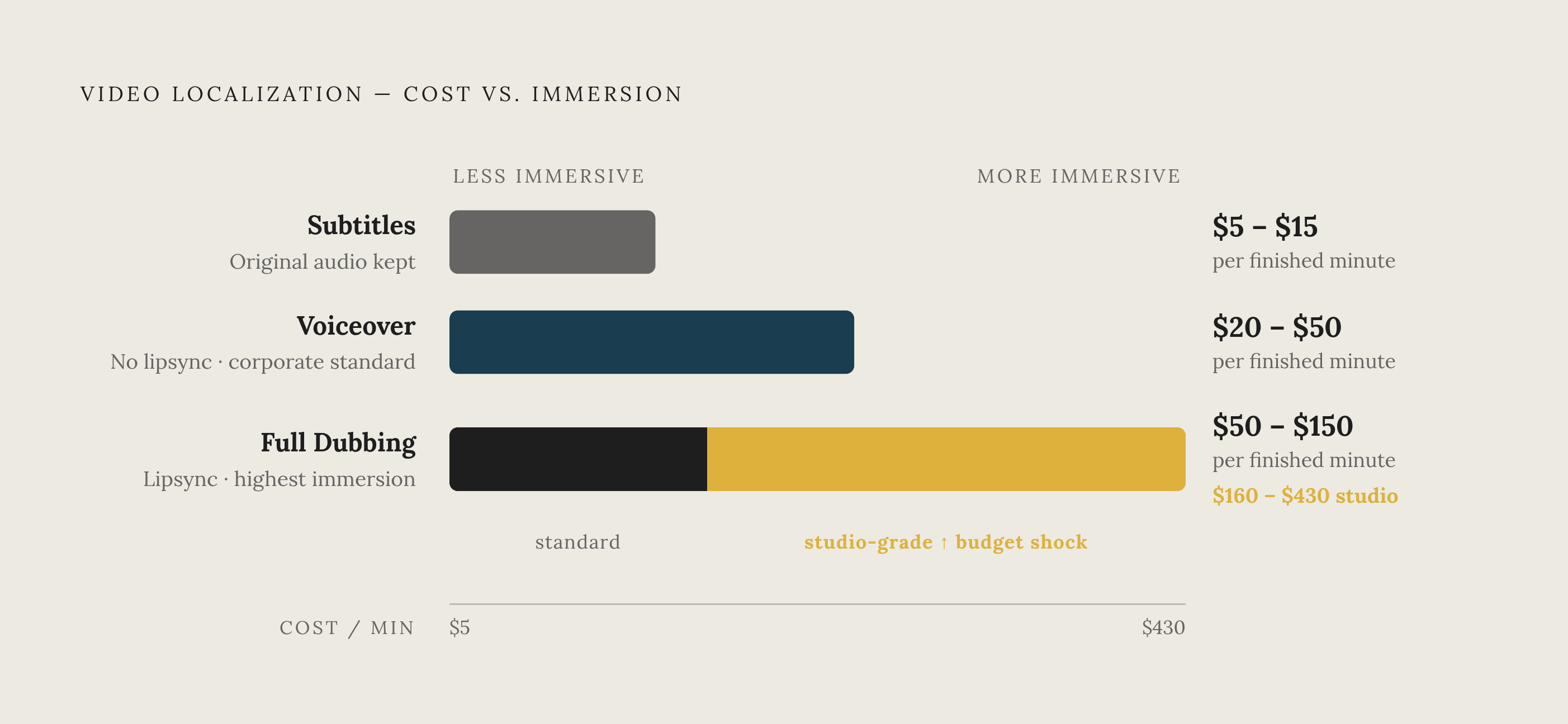
Traditional localization agencies charge somewhere between $100 and $500 per finished minute of video, with turnarounds running two to six weeks per language.
The spread comes down to which of three tiers a team picks:
Subtitling only: $5 to $15 per minute. Cheapest option, but learners lose the immersion of hearing their own language. Voiceover without lipsync: $20 to $50 per minute. This is the workhorse tier for corporate training and e-learning, usually running 30% to 50% cheaper than full dubbing. Full dubbing with lipsync: $50 to $150 per minute, and studio-grade dubbing specifically is between $160 and $430 per minute.
Run the math on something modest: a five-minute training video, localized into five languages, through a traditional agency workflow. That single video costs $22,500 to $32,500 or more, before anyone's touched the interactive layer or the source course itself.
And video is only part of the course. Localization adds roughly 30% to 70% on top of whatever the media production already cost. A standard compliance course built by an outside vendor runs $3,000 to $15,000 to begin with. Multiply that by however many languages the program needs, and the number stops looking like a line item and starts looking like a budget category of its own.
The eight cost drivers that determine where your budget actually goes
Blue Carrot's research breaks the cost problem into eight factors. Three of them do most of the heavy lifting.
Number of languages is the obvious one, but it hides a subtler cost: dialects. Spanish for Spain isn't Spanish for Mexico isn't Spanish for Argentina, and treating them as interchangeable is how programs end up with translation that reads as foreign to half the audience it was built for. Each dialect variant adds its own translation and QA pass.
Amount and variety of media matters just as much. A course built from slides and PDF handouts localizes cheaply. A course loaded with video, custom infographics, and branching simulations costs multiples more, because every asset type has its own production pipeline and its own vendor.
Scope of media adaptation is where the real budget swing lives. The choice between subtitles, voiceover, and full dubbing isn't a technical detail, it's a budget decision with a direct tradeoff against learner experience. Picking subtitles across the board to save money is fine for some content and a mistake for training that depends on tone, pacing, or a trainer's credibility coming through in their voice.
The other five drivers (glossary management, review cycles, QA rounds, project management overhead, and file format complexity) all compound these three rather than acting independently. None of them show up as a clean line item on an invoice, which is exactly why they're so easy to underbudget.
How AI-powered tools are changing per-language economics
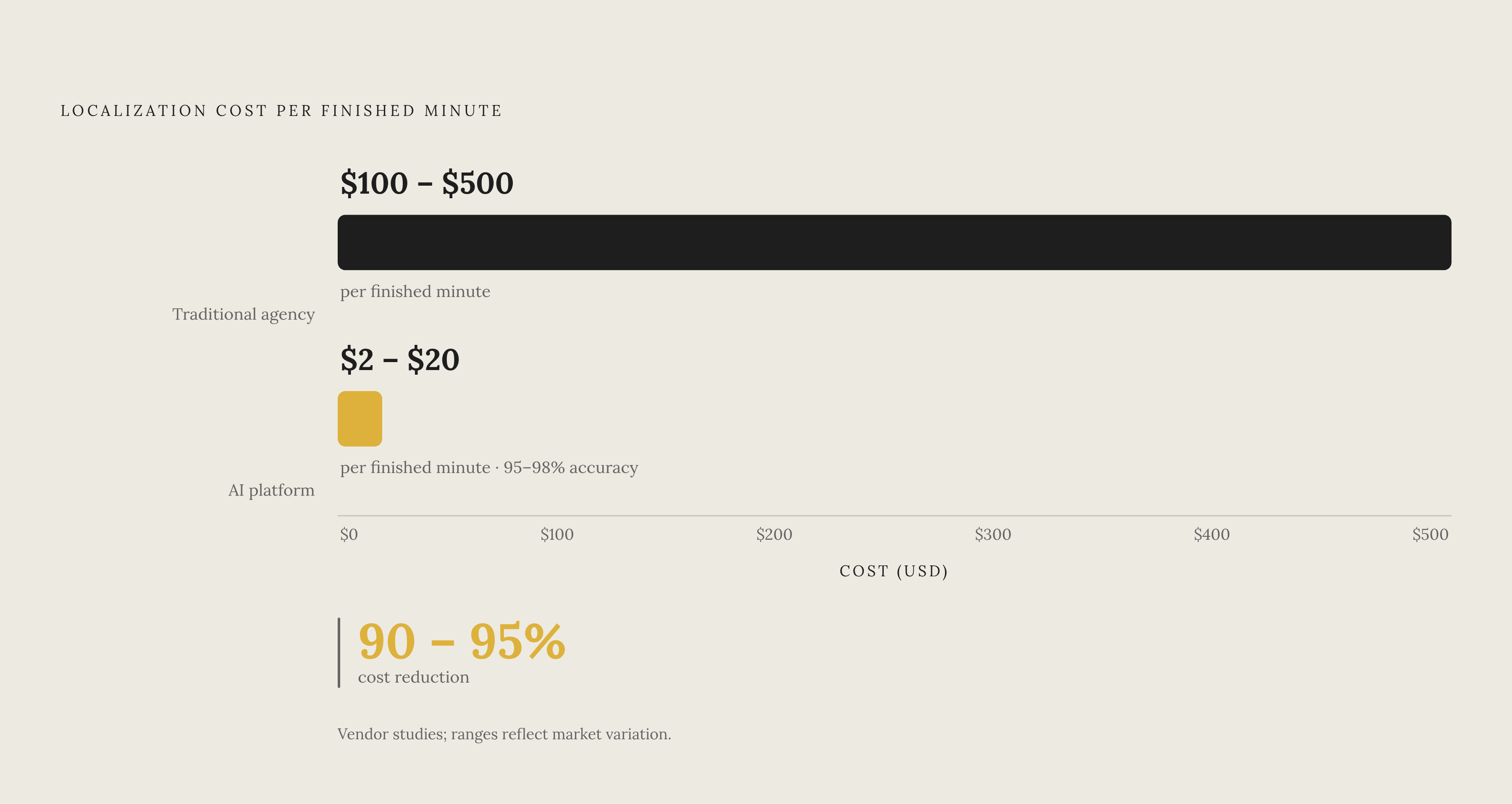
The gap between old and new pricing is not subtle. Traditional agency work runs $100 to $500 per minute. AI video translation platforms run $2 to $20 per minute, with accuracy in vendor studies around 95% to 98%. That's a 90% to 95% cost reduction for output that, on paper, is nearly as accurate as a human-only process.
Immersive Fox frames its own savings at up to 80% compared to a traditional agency workflow, trading per-language studio fees for significantly lower per-minute pricing. That pricing shift matters as much as the raw cost drop: subscription pricing means a team can localize into a sixth or seventh language without renegotiating a new agency contract each time.
Adoption backs this up. Seventy-three percent of online education platforms have already worked AI-generated instructional video into their production process, reporting a 41% lift in learner engagement. On the corporate side, 46% of training programs now use AI-generated interactive video scenarios.
Two distinct categories of tools have emerged by 2026, and they solve different problems. Presenter-style avatar tools put an AI-generated face on screen reading a script, which suits narrative-driven training where a "host" walking learners through content matters. Workflow documentation tools instead capture a screen recording and automatically generate step-by-step guides, which fits software training specifically, since the point isn't a presenter, it's showing exactly which button to click.
Sales enablement has its own angle worth noting. Allego's AI Role Play and Coaching tool runs unscripted simulations in 32 languages, using 71 distinct voices and accents. That's a different use case than course localization, but it points at where this category is headed: not just translating fixed content, but generating language-specific practice on demand.
Platform infrastructure: where localization cost compounds if you get it wrong
Skip a proper multilingual LMS and the cost doesn't disappear, it just moves somewhere less visible. Teams end up maintaining parallel course versions by hand, building manual workarounds for language delivery, and running regional reporting in silos, which makes it nearly impossible to see whether the localization spend is paying off.
A mature multilingual LMS handles four things well: a fully localized interface from login screen to final quiz question, a structured translation workflow instead of an ad hoc one, regional settings like currency and date formats and accessibility rules, and unified reporting that rolls every region into one view instead of ten.
The market has real differences before picking a platform.
D2L Brightspace offers dedicated implementation and strategic advisory support, ships with D2L Lumi AI (built so educators direct every AI interaction rather than automate around them), and is born-accessible to WCAG 2.2 at release. D2L Creator+ handles no-code interactive content, and D2L Performance+ adds predictive analytics. D2L's own August 2026 comparison lists Brightspace first, worth noting given D2L publishes that review itself. SAP Litmos covers a 37-language UI with automatic language detection and mobile apps that support offline SCORM. It has no built-in AI translation. Pricing is quote-based. Cornerstone OnDemand runs in 50 languages across 180 countries, with its Skills Graph available in 35 languages. Median contract value is $17,850. TalentLMS includes an AI Translator covering 40-plus languages and a TalentCards microlearning app that can translate content into 100-plus languages. Pricing starts at $1,428 a year. LearnUpon offers 25-plus languages out of the box, and each sub-portal can run in a different language independently. Median contract value is $30,064. Absorb LMS supports a 21-language UI, with Intelligent Assist and Create AI handling admin-side tasks. Median price is $19,777. Moodle Workplace covers 20-plus languages through its AMOS translation system, is open-source, and has a plugin ecosystem. Pricing is quote-based. 360Learning offers one-click AI translation across 60-plus languages, custom glossary uploads, and RTL support on mobile. Pricing starts at $8. Docebo supports 50-plus languages, with AI avatar video presenters, plus auto tagging and skill assignment. Pricing is quote-based. iSpring Learn covers 34 languages, starting at $770. Blackboard Learn supports 20-plus languages, with pricing starting around $16,500.
Before picking any of them, four questions actually separate the platforms that work for software training from the ones that create more manual work: Does it support right-to-left languages natively, or does that need a workaround? Does it translate content in-platform, or does everything need to arrive as a pre-translated SCORM package? Can sub-portals run independently in different languages? And does reporting break down by language and country, or does it only show aggregate numbers that hide exactly where the localized content is underperforming?
Design decisions made before production that determine localization cost later
Every localization cost problem traces back to one decision made before a single frame gets shot: will this course need to be reshot for each language, or was it built so it doesn't?
A handful of choices at the design stage change everything downstream:
Write narration in plain, short sentences. A limited use of idioms means less word-count expansion in translation and less ambiguity for translators guessing at intent.
- Skip culturally specific humor and locale-bound UI examples. A joke or reference that needs a full rewrite for a different market isn't localization, it's a rewrite with extra steps.
Build slide layouts with meaningful expansion headroom. Many languages run longer than English, and layouts built tight to the English text break the moment they're translated. Keep text out of embedded video graphics. On-screen text baked into a video requires actual production work to replace. A subtitle track just gets swapped. Record narration audio separate from video. This alone makes re-recording, or substituting an AI-generated voice track later, a simple swap instead of a reshoot.
Terminology consistency deserves its own line. Keeping a shared glossary of product terms across every course prevents one course from calling a button "Settings" and another calling it "Preferences" in the same language. For software training specifically, where the UI label has to match the actual product exactly, that inconsistency isn't a style issue, it's a usability bug in the training itself.
And when the budget can't stretch to cover every relevant language at once (which is most of the time), the ranking shouldn't be arbitrary. Learner population size, regulatory requirement, and revenue exposure by market give a defensible order. Spreading a fixed budget thin across ten languages at mediocre quality serves nobody as well as doing four languages properly.
Measuring the return on localization spend in software training programs
The ATD and CSA Research numbers cited earlier point at outcomes, satisfaction, retention, preference, but a program still needs to tie those outcomes back to what got spent to produce them. That means tracking completion rates and quiz performance by language and region, not just in aggregate, since a global average can hide a market where the localized course is quietly failing.
Support ticket volume by region is another signal to watch, particularly for software training: if a market that got a fully dubbed, culturally adapted course files far fewer product-usage tickets than one that got subtitles only, that gap is the localization spend showing up as a hard cost saved elsewhere.
None of this works without the reporting infrastructure described earlier. A platform that only shows aggregate completion numbers can't tell a team if the substantial sum spent dubbing a course into another language moved the needle in that specific market. Getting that visibility right is what turns localization from a cost center into a line item with a measurable, defensible return.