Production Quality Tiers for Different Training Video Use Cases
Match production tier to training need, not budget anxiety or habit.

Not every training video needs the same budget, the same crew, or the same hours in the edit bay. The use case, onboarding, compliance, a software walkthrough, sales enablement, should decide the production tier, not habit or fear of looking cheap. Get that match wrong and there are only two ways to fail: dump money into a video that's obsolete in six months, or ship a raw screen recording that makes the whole company look sloppy.
Training spend keeps climbing and video keeps eating a bigger share of it. ATD found 96% of organizations now use video as a core part of workplace learning. That number settles the argument that video belongs in the training stack. It doesn't touch the harder question, which is which kind of video belongs where.
Most teams default to one of two failure modes. Either they hand out unedited screen recordings that quietly signal "we didn't have time for this," or they commission a fully animated, professionally narrated production for content that will be rewritten the next time the software updates. Neither is inevitable, and neither is excusable anymore. Matching the tier to the task is a discipline, and AI-assisted production has made that discipline more urgent, not less, because higher quality is now affordable for almost anything. Skipping this step is a judgment call somebody made without thinking it through. It's a judgment call somebody made without thinking it through.
What production quality means across a training video program
Quality breaks into four dials, and they move independently of each other:
- Visual production: camera work, lighting, animation, graphics
- Script and instructional clarity: does the video have an observable goal, and does the narration stick to the approved source material?
- Audio: voiceover quality, background noise, pacing
- Updateability: how fast this gets revised when the policy, product, or process changes
Updateability is the one teams ignore, and it's the one that costs them most. L&D leaders name "keeping content current" as a top challenge more than almost anything else in the field, and that's not a training problem, it's a production-planning problem. Nobody built updateability into the quality bar from the start, so it becomes a fire drill every time something changes.
A video can look expensive and still be a bad training asset. Gorgeous motion graphics paired with a script that wanders off the source material, or that never states what the viewer should be able to do afterward, is low quality no matter what it cost. Production value and instructional clarity are separate scores, and treating them as one score is how companies end up paying agency rates for a video nobody can use.
Assign a visual tier to each scene type before anyone touches a camera or an AI tool: narration only, text support, simple diagram, light illustration, full animated sequence. Deciding this upfront keeps cost and scope from drifting once production starts.
Three production paths exist, and they don't compete with each other so much as answer different questions. Traditional filming, camera, lighting, real talent, a real location, makes sense when the content needs real people doing real physical tasks in a real environment. Screen recording with narration is fast and cheap to produce and update, which makes it the natural fit for software walkthroughs and process documentation. AI-powered video production fits scenario-based training, animated explainers, product demos, and visual storytelling that needs to scale across many topics without scaling the headcount behind it.
The framework that holds up under pressure asks one question: what does the viewer need to understand, remember, or do, and what production investment is proportionate to getting them there? Everything else is decoration.
The cost and time reality that makes tier matching matter
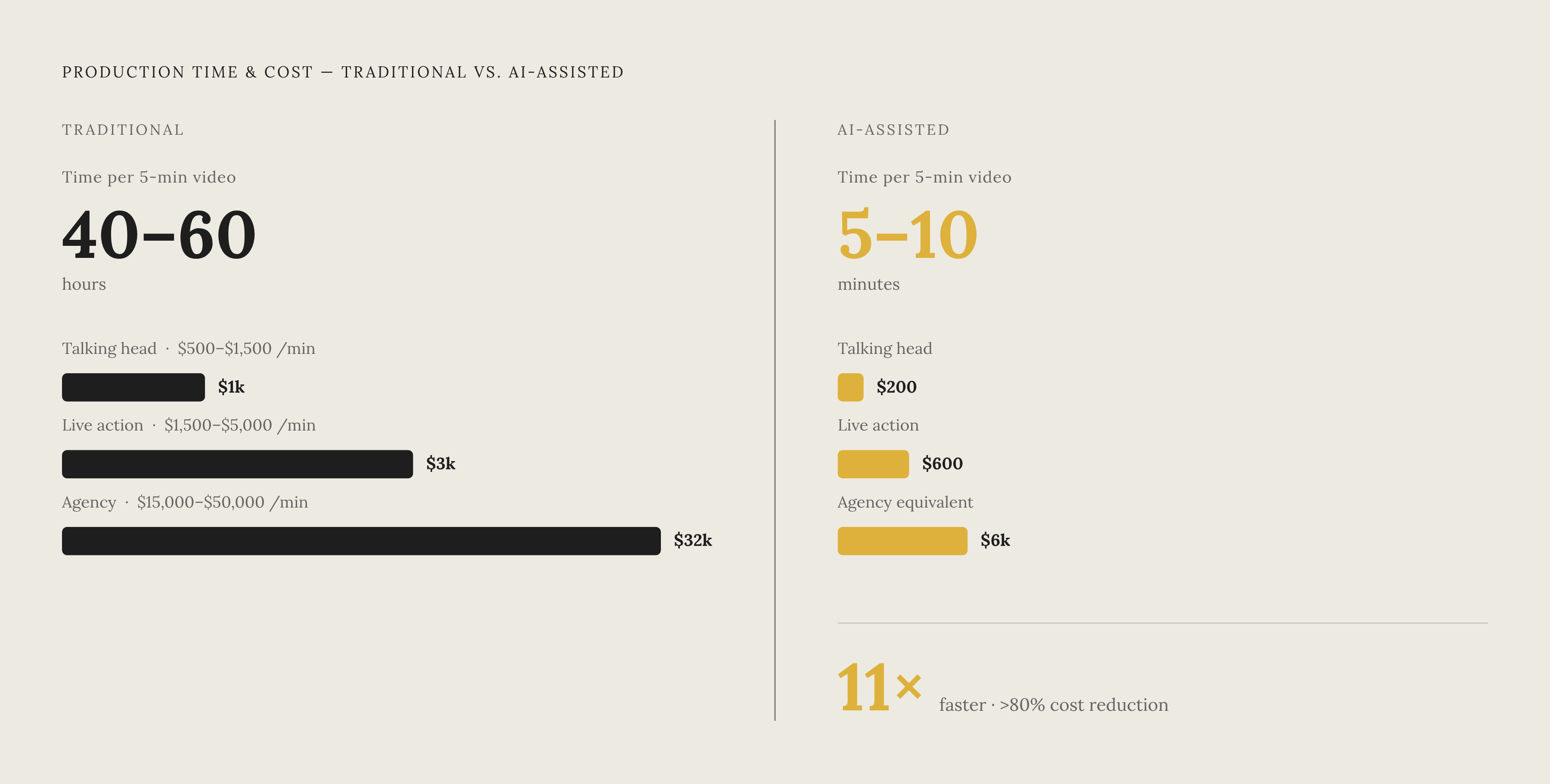
The numbers make the stakes concrete. Basic talking-head video runs roughly $500 to $1,500 per finished minute. Professional live-action runs $1,500 to $5,000. Interactive modules with branching or quizzes run $10,000 or more. Full agency production runs $15,000 to $50,000 per finished minute. A finished hour of eLearning can eat 80 to 300 production hours depending on how much interactivity gets built in. That ratio turns brutal fast when the underlying process changes six months after launch and the whole thing needs rebuilding from scratch.
Traditional production of a single five-minute training video takes 40 to 60 hours of combined effort across writers, editors, and voice talent. AI-assisted production can cut that to 5 to 10 minutes from raw recording to publishable video, something close to an 11x speed gain, with per-minute costs dropping 80% or more depending on complexity. Content that used to sit as a raw, unedited recording because polish "wasn't worth it" can now get real production treatment inside a reasonable budget.
That shifts the actual bottleneck. AI tools have mostly solved production capacity, so the constraint moves to decision-making speed: which tier does this content actually deserve, and who decides that. The cost barrier to over-producing has fallen, and that makes choosing the right tier more consequential, not less, because there's no longer a budget wall stopping a team from picking the wrong one.
Updateability compounds the cost equation over time. A glossy, fully filmed video that needs a reshoot every time a policy changes will cost more across its life than a well-structured AI-assisted video that gets revised in minutes. Cheap-to-update beats expensive-to-look-at once anyone bothers to count total cost of ownership instead of the invoice from the first shoot.
Software walkthroughs and product training: the highest-volume, lowest-tier use case
For SaaS and tech companies, software walkthroughs are the volume business. Features ship weekly. UI elements move. Every product update quietly puts an expiration date on existing training content.
The common failure here is the raw screen recording: no clean narration, no zoom on the button that matters, no captions, no real structure, just someone clicking through a workflow while thinking out loud. It becomes the default because real production felt too slow or too expensive to justify for something that might change again next sprint. That reasoning made sense five years ago. It doesn't hold up now that AI cleanup takes minutes instead of days.
This use case needs less than people assume, and what it needs is specific: narration tied directly to what's happening on screen, scripted rather than improvised; smart zoom or highlighting on the exact UI element being shown; captions, both for accessibility and for the large share of viewers watching with sound off; short modules, three to four minutes max, each covering one task; and a structure that's easy to revise without a full reshoot when the interface changes.
What it doesn't need matters just as much: live actors, studio lighting, location shoots, elaborate animation, branching logic. None of that improves comprehension of a procedural software task. It just adds cost and adds friction the next time the button moves.
Microlearning is the format that fits, short, tightly scoped modules with a quick knowledge check at the end. Breaking content into three-to-four-minute focused modules lifts retention over longer formats, and it lines up with how people actually want to learn on the job: most employees want just-in-time learning available the moment they need it, not a 40-minute course they have to schedule around.
AI-assisted screen recording workflows hit this tier well. Record the raw screen capture, let AI clean up and rewrite the narration, add voiceover, apply smart zoom, generate captions, and produce step-by-step documentation from the same source, all without a video specialist in the loop. Video and written documentation shouldn't come from two separate efforts. Generating both from one recording is where this use case earns its real payoff.
Customer onboarding videos: where a small production step-up pays measurable returns
A modest bump in production quality raises onboarding numbers directly. Companies that deploy onboarding video effectively see measurable reductions in support call volume, and that alone justifies spending a bit more than the bare minimum.
Onboarding video splits into four types, each with its own natural tier. Animated explainers cover how the product works conceptually, benefit from clean motion graphics and a properly voiced script, and belong at the top of the sequence, before the user has even opened the app. Screen recordings with narration show the actual product interface, sitting at the same tier as a software walkthrough but with a tighter script and cleaner audio, since the audience is a paying customer instead of an internal user. Interactive walkthroughs let the user practice inside the live product; they cost more to build but earn that cost back for complex products with high early churn. Embedded micro-animations, short looping clips or GIFs inside the UI itself, cost almost nothing to make and work because they appear directly at the point in the interface where confusion occurs.
Structure matters as much as format. A welcome video at first login, then additional content released as the user advances through the product, beats dumping one long onboarding video on someone before they've logged in once.
Human presence still counts for something specific here. Most people say they prefer a real person over an AI avatar or animated character in instructional video. For high-touch, customer-facing onboarding, that preference should weigh on tier selection, particularly for enterprise accounts where trust is part of the sale.
PLG and enterprise onboarding call for different tiers, and treating them the same is a mistake. Product-led growth users need something scalable: screen recording plus narration, produced fast enough to keep pace with a product that changes every sprint. Enterprise accounts can justify a higher-touch format, a presenter-led video or personalized elements, and AI-avatar or templated personalization can scale that without a full custom shoot for every account.
Five metrics tell you whether the tier picked was the right one: video completion rate, time from signup to first meaningful action, support ticket volume on topics the videos already cover, feature adoption for the capabilities demonstrated, and day-1/day-7 retention comparing viewers against non-viewers.
Compliance and safety training: the use case where production credibility is non-negotiable
Compliance and safety training carries legal weight the other categories don't, and the production quality itself becomes part of the message. A video that looks thrown together tells employees the organization doesn't take the material seriously, regulator or no regulator.
Completion rate isn't just an engagement metric here, it's a legal exposure metric. A meaningful share of employees who pause a training video mid-content never come back to finish it. For mandatory compliance training, that's an audit gap waiting to surface at the worst possible moment.
This use case demands scenario-based storytelling that shows the real consequence of doing something wrong. Beyond that, the right tier splits by content type.
For physical safety demonstrations, training driven by regulatory safety requirements, manufacturing floor procedures, healthcare protocols, traditional filming still carries the most weight. A camera showing a real person doing the task correctly in the real environment has a credibility animation can't fake, and no amount of clever motion graphics closes that gap.
For policy-based compliance, HIPAA, anti-harassment, data privacy, the content is conceptual and verbal rather than physical, which makes AI-avatar or animated tiers a genuinely viable option. The bar there is clarity and authority, not physical realism.
Updateability is a legal issue in this category. Regulations change, legal language gets rewritten, and a compliance video that needs a full reshoot to reflect a small regulatory update is a liability sitting on a shelf. The same struggle L&D leaders report with keeping content current hits hardest right here, where an outdated video isn't just stale, it's a documented gap somebody has to explain later.
Sales enablement videos: where persuasion requirements drive tier selection
Sales enablement splits into two audiences, and they don't belong in the same tier. Internal rep training, pitch coaching, objection handling, product knowledge, is about absorption. Reps need to internalize the material, not admire the cinematography. Screen recordings of the product paired with clean narration and context are enough, and accuracy matters far more than visual polish.
External-facing demos and leave-behinds require a different approach. The prospect watching that video is evaluating the vendor, not just the product, and a rough recording quietly signals a rough company. A step up in visual polish is earned here, and skipping it costs credibility in a way that's hard to measure but easy to feel in a lost deal.
Most workers say they'd rather learn from video than read, and sales reps are no exception: product knowledge delivered as video tends to get finished at a higher rate than formats that make it easy to defer or skip entirely.
Speed matters more in sales enablement than almost anywhere else. Pricing shifts. Competitive positioning shifts. Features change. A rep training video that's four months stale doesn't just sit there unused, it actively feeds reps the wrong talking points in a live deal, and that's worse than having no training video.
AI-assisted workflows fit naturally here. Generate a product demo from a screen recording with clean narration and captions, update it the moment a feature changes, and push it out immediately, no agency queue, no waiting on a production calendar. For external demos where a human presenter still matters, an AI avatar or a simple webcam setup with professional framing can clear the credibility bar without a studio budget.
Sales enablement is also where localization turns directly into revenue. A demo that only exists in English leaves entire markets sitting untouched. Translating that same asset into 33-plus languages with one click turns a single video into a global sales tool instead of a domestic one.
AI-assisted workflows that let teams move up tiers without increasing headcount
The underlying AI video pipeline has gotten shorter, not just faster. Producing an AI video used to mean stitching together five separate systems: text conditioning, video generation, audio generation, audio-video sync, and upscaling. Much of that now runs through a single model. Fewer handoffs means fewer places for the process to stall out.
Teams using these tools report producing far more content with the same staff, and the bottleneck moves from "can we build this" to "should we build this, and at what tier." That's a good problem to have. It's still a problem, though: the tier framework, produced by treating tiers as a fixed ladder rather than a flexible toolset, becomes the actual constraint on output rather than the software underneath it.
Tool sprawl works against this. Analysts tracking the AI video stack found creators went from using an average of 1.2 tools for AI creative work to 3.4. That's not efficiency, that's fragmentation, and the teams getting real scale out of this are converging on one integrated workflow instead of stitching together five point solutions that each do one thing.
A tier upgrade that works in practice follows a simple sequence. Record or upload a raw screen capture. Let AI rewrite the narration for clarity and instructional alignment. Add lifelike voiceover with smart zoom on the relevant UI and full captions. Generate the accompanying step-by-step documentation from that same source recording at the same time. No separate documentation project, no second team, just one recording, produced once, output at whatever tier the use case actually earned.