Brand Consistency Standards Across High-Volume Training Video Libraries
Speed and scale collapse without embedding brand rules into the tools creators actually use.
Training video production used to be a project. Now it's an operation, running continuously, fed by remote teams, global workforces, product updates that never stop, and policy changes that land every quarter. That shift in volume is what breaks brand consistency, and it breaks it quietly, one video at a time.
The money at stake makes this more than a cosmetic concern. U.S. Employers spent $102.8 billion on training, with spend averaging $1,207 per employee, so content that drifts off-brand directly erodes that investment. It's a value leak, dollar for dollar, at a scale most L&D budgets can't absorb without noticing.
Most companies aren't equipped for this. Only 30% have brand guidelines that are actually used and recognized across the organization, and 15% have no guidelines at all.
Adding more creators makes the math worse fast. One person with a good eye can hold a library together through instinct alone. Twenty people spread across five departments cannot hold a library together through instinct alone; without a governing structure, coordination breaks down as headcount grows. And AI has already changed the volume equation: 93% of organizations now use AI-powered video tools for their L&D programs. More output capacity without a governing system doesn't produce more consistency. It produces more inconsistency, and it produces it faster.
Speed and scale may be solved problems in 2026, but only 30% of companies have brand guidelines that are widely used and recognized across the organization, and 15% have no guidelines at all. Consistency does not follow automatically from faster production; it has to be built into the process from day one, or the output never shows it.
What brand consistency means in a training video library
Brand consistency isn't one decision made once. It's a stack of standards that all have to hold at the same time, across every single video in the library, indefinitely.
Start with the visual layer: logo placement, color palette, typography, motion graphics. Autodesk's video brand guidelines are specific to the point of being blunt about it, the logo sits in the lower-right corner during playback but never appears during titles, sections, lower thirds, or transitions. That kind of precision matters because small drift, left unchecked, adds up into a library that looks like five different companies made it.
Audio matters just as much, maybe more, because tone is harder to fake and inconsistent tone signals a lack of coordination that viewers pick up on immediately. A library where half the videos sound warm and conversational and the other half sound like a compliance memo tells the learner, without saying it outright, that different teams made these with no coordination between them. Structure carries the same signal: consistent opens and closes, chapter formatting, caption style, end cards. Viewers pick up on these patterns without consciously noticing them, and when the patterns break, professionalism takes the hit.
Accessibility belongs on this list too, as a core piece of what a professional brand looks like now. WCAG 2.1 AA compliance, caption standards, and contrast requirements are baseline expectations now, not optional add-ons. They're baseline expectations.
Some pieces of this stack should be locked down completely: logo files, brand colors, intro and outro animations. Others need room to flex, script tone for a compliance video should read differently than a software walkthrough, and that's fine. What ties it together is governance: who approves a video before it ships, who owns the style guide, what the brief and approval process actually looks like. Without that layer, standards erode quietly, even with a perfectly good style guide sitting in a shared drive somewhere.
The limits of a style guide alone in solving the consistency problem
Most organizations treat this as a documentation problem. Write the guide, share the link, expect people to follow it. That approach breaks down once volume increases, because manual documentation can't scale with output.
A PDF style guide asks a lot of a creator working under a deadline. Bad intentions aren't the issue. Creators moving fast default to whatever's on hand, whatever they remember, whatever they can improvise in the moment, because without the right assets sitting right in front of them, improvising is what happens.
Governance without tooling just moves the bottleneck somewhere else. If a brand manager has to manually check every video before it ships, that review step becomes the thing slowing the entire operation down, and everyone waiting on approval feels it. The 2026 numbers make this sharper: 52% of corporate training programs have now adopted AI video creation, and content volume has grown faster than most review processes were built to handle.
So the fix isn't a better document. Embedding the rules into the tools and templates people already use to make videos means the rule gets followed because it's the path of least resistance.
Building the asset library that governs the library
The asset library is what makes a style guide operational. Instead of asking a creator to make a decision, it lets them select from a set of options that are already approved.
A governed library needs versioned templates for each aspect ratio in use. Landscape (16:9) still leads at 52.8% of format usage, but vertical (9:16) is close behind at 43.7%, so both need their own governed template, not an afterthought bolted onto the widescreen version. Beyond that: locked lower-thirds and title cards, approved music stems, motion graphics packages built once and distributed to every internal team and outside vendor (this alone eliminates one of the most common sources of visual drift), caption style presets, end cards, thumbnail templates, and every font file and logo variant in the formats people actually need.
Some of this should be editable by creators, script text, on-screen callouts. Some of it should be locked entirely, the intro animation, the logo files themselves. That split is a permissions decision as much as an organizational one, and it needs to be made deliberately rather than left to whoever has admin access.
Version control is where a lot of libraries quietly fail. When a brand asset updates, the old version needs to come out of circulation and every active template needs to reflect the change. A library with three competing versions of the same logo floating around defeats the entire purpose of building one. None of this runs itself, either: someone needs to be the named brand steward, with reviewers assigned for creative, legal, accessibility, and regional exceptions. Without an owner, the library goes stale, and stale libraries get ignored.
Standardized templates turning individual judgment calls into repeatable decisions
Templates do for video production roughly what a standard operating procedure does for any other kind of operation. They take decisions that were made once, by someone with good judgment, and turn them into a format that doesn't require that person to be in the room every time.
A useful template set covers the actual range of video types running through the library: software walkthroughs, compliance refreshers, onboarding modules, feature updates, quick-tip clips. Each one should lock in aspect ratio, intro and outro sequence, caption style, logo placement, the approved voice profile, and chapter structure, so filling in the template physically can't produce an off-brand result.
Templates aren't just about looking consistent, either. They encode structure that actually improves how well people learn: one topic per video, three to six minutes at the outside, captions on by default, a clear learning objective, completion tracking built in. Length affects how well people learn and how much they retain, so teams that treat it as a minor detail undermine their own content. Quick tips run 30 to 90 seconds, tutorial walkthroughs 2 to 5 minutes, onboarding modules 5 to 10 minutes, certification content up to 20 minutes, and the data backs up why that discipline pays off: completion averages around 50% for videos in the 2-to-10-minute range, against 66% for anything under a minute. A good template makes the shorter, tighter length the default choice, not something a creator has to fight for.
There's a second benefit that's easy to undervalue: templates make onboarding new creators fast. A regional HR manager or someone on the CS team can sit down and produce something on-brand without ever sitting through a training session on the style guide. The template carries the knowledge so the person doesn't have to.
AI-assisted workflows enforcing brand standards at the point of creation
AI-assisted platforms change where enforcement happens. Instead of catching brand violations after a video is finished, rules get embedded into the automated steps of creation itself, so standards apply the moment content gets generated, not audited after the fact.
Brand Kit automation is the clearest version of this. A platform with that functionality applies logos, colors, fonts, and visual style to every video automatically, without a human editing each one by hand, so the creator physically cannot forget to apply the brand because the platform already applied it. Voice works the same way: pick one approved AI voice profile, or a small set for different content types, and restrict creators to that selection, and audio consistency locks in at the exact same moment visual consistency does.
Script standardization closes another gap. AI-driven script cleanup normalizes language, tone, and reading level across content written by wildly different subject-matter experts, so a compliance video drafted by a lawyer and a tutorial drafted by a developer can both come out narrated in the same brand voice. Smart zoom, caption placement, highlight callouts, all of that gets applied by preset rule rather than by whoever happened to record the screen capture that day, so the finished product looks the same regardless of who made it.
The scale argument here isn't subtle. Teams using AI video tools report producing five to ten times more content with the same headcount. At that multiplier, manual brand review isn't just inconvenient, it's mathematically impossible to keep up with, which makes upstream enforcement a necessity rather than a nice-to-have. What's left for humans narrows down to the decisions that actually need a person: accuracy, messaging, and strategic appropriateness of the content. The review queue shrinks to what it should have been all along.
Scaling the system across teams, languages, and update cycles
A system built for one team has to survive contact with everyone else. Once regional teams, outside vendors, or cross-functional contributors start touching the library, the same template-and-asset structure needs to travel with them, unchanged.
Localization is where this gets tested first. One-click translation should be built into the workflow, not treated as a side project someone spins up when a new market opens. Platforms supporting 160-plus or 200-plus languages through AI voiceover mean a single source video can become a fully localized version without anyone booking a new recording session. Treating localization as an exception process instead of a default feature guarantees inconsistency between markets.
Updates are the other pressure point, and they're a governance problem as much as a production one. Policies change, product interfaces change, internal workflows shift constantly, and in traditional production, updating a heavily edited video often means starting over almost from scratch. A governed AI-assisted system makes that update cheap enough that the library can actually stay current instead of slowly going stale. That problem compounds at scale, too: real asset versioning and template control are what let an organization running dozens or hundreds of modules know which videos a given change affects, update them systematically, and push new versions out.
Microlearning helps here in a specific, practical way. Converting long-form training documentation into short, focused modules means changing one three-minute clip instead of revising an entire thirty-minute course every time something shifts. And increasingly, this content doesn't live in one place anymore. Training embedded directly into help desks, CRMs, and knowledge bases reaches learners at the moment of need, but that only works if the embedded content is already on-brand and consistently formatted, because it's now carrying that brand onto third-party surfaces. 84% of L&D teams cite faster production as the main benefit of AI video tools, and 66% report better learner experience. But speed without a governing system just means more inconsistent content, produced faster than anyone can catch, because the system is what enforces consistency, not the speed of production.
A production system built around these principles in practice
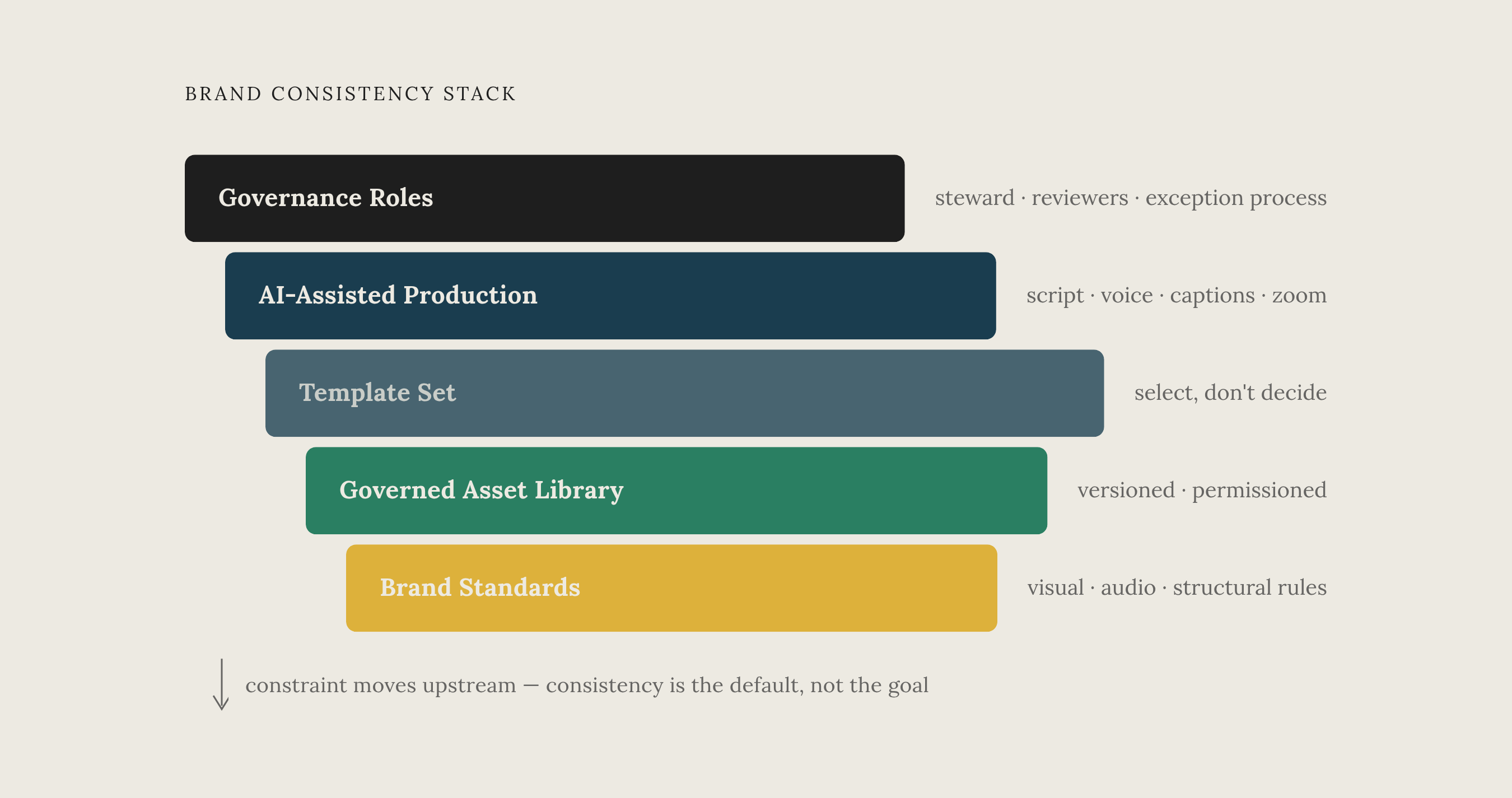
A working system has five layers, and each one depends on the layer before it. The brand standards document is the written source of truth, visual rules, audio rules, structural rules. The governed asset library turns that document into versioned, permission-controlled files, logos, fonts, templates, music, motion graphics. The template set turns those files into blueprints for each content type, so creators select rather than decide. The AI-assisted production layer is where recording, scripting, voiceover, zoom, and captions all get generated inside that framework automatically. And governance roles, a named brand steward, designated reviewers, a clear approval process, handle the exceptions without turning into a bottleneck.
What this buys, structurally, is a shift. Quality control moves from a post-production review step to an upstream constraint, making brand consistency the default output rather than something hoped for at the end.
For teams producing software training content specifically, the AI-assisted workflow layer is where most of the leverage sits. A platform that takes a raw screen recording and returns a polished, on-brand video, accurate voiceover, smart zoom, branded captions, a matching documentation article generated alongside it, closes the gap between subject-matter experts who know what to explain and video professionals who know how to make it look right. Inconsistency usually takes root in that gap.
The real test of whether a system works is simple to state, harder to achieve: can any contributor, on any team, produce a video indistinguishable in brand quality from one made by the most experienced person in the building. If the answer is yes, the system is carrying the brand, not the individual, and that's the entire point of building one. For teams just starting this work, the first move isn't designing templates. It's auditing what already exists, finding out exactly where the inconsistency lives, in the intros, the voice, the caption style, the logo placement, because those existing gaps are precisely the decisions the template set needs to make on behalf of every creator who comes after.
Sources
- Video Style Guide for Brand Consistency: 2026 Guide
- Video Brand Guidelines: A Practical Playbook for 2026
- Training Video Complete Guide: Types, Best Practices, and How to Create Them | Knowlify
- How to Build a Long-Term Video Content Library | Media Village
- How Do You Keep a Training Video Library Consistent as Your L&D Team Grows? — Biteable
- Brand & Scale: keeping colours, fonts and voice consistent - vidBoard.ai
- Brand Consistency Strategies Guide for 2026 | GitNexa | GitNexa Blog | GitNexa
- How AI is Revolutionizing Video Production for Brands in 2026 | Bandish Studios