Pacing and Script Density Standards in Software Tutorial Videos
Slow scripts retain viewers; tutorials need 90–120 words per minute.

A viewer opens a software tutorial, watches the first few steps, and quits before reaching the answer to their question. That drop-off is a scripting failure, not a sign of weak production values or a boring presenter, and it follows a predictable pattern: videos that cram in more information lose people faster, not slower. AI-generated scripts in particular tend to prioritize stuffing in facts over giving the viewer room to breathe, and that trade-off pushes abandonment rates up sharply within the first 15 seconds. The old instinct, that more detail per minute means more value delivered, doesn't hold up against the data. What holds up instead is a set of measurable limits on pace and density, the same way a bridge has a load limit. Once you know where those limits sit, fixing a tutorial's pacing becomes a matter of checking the script against a standard before it's ever recorded.
The words-per-minute targets that distinguish tutorial pacing from other video formats
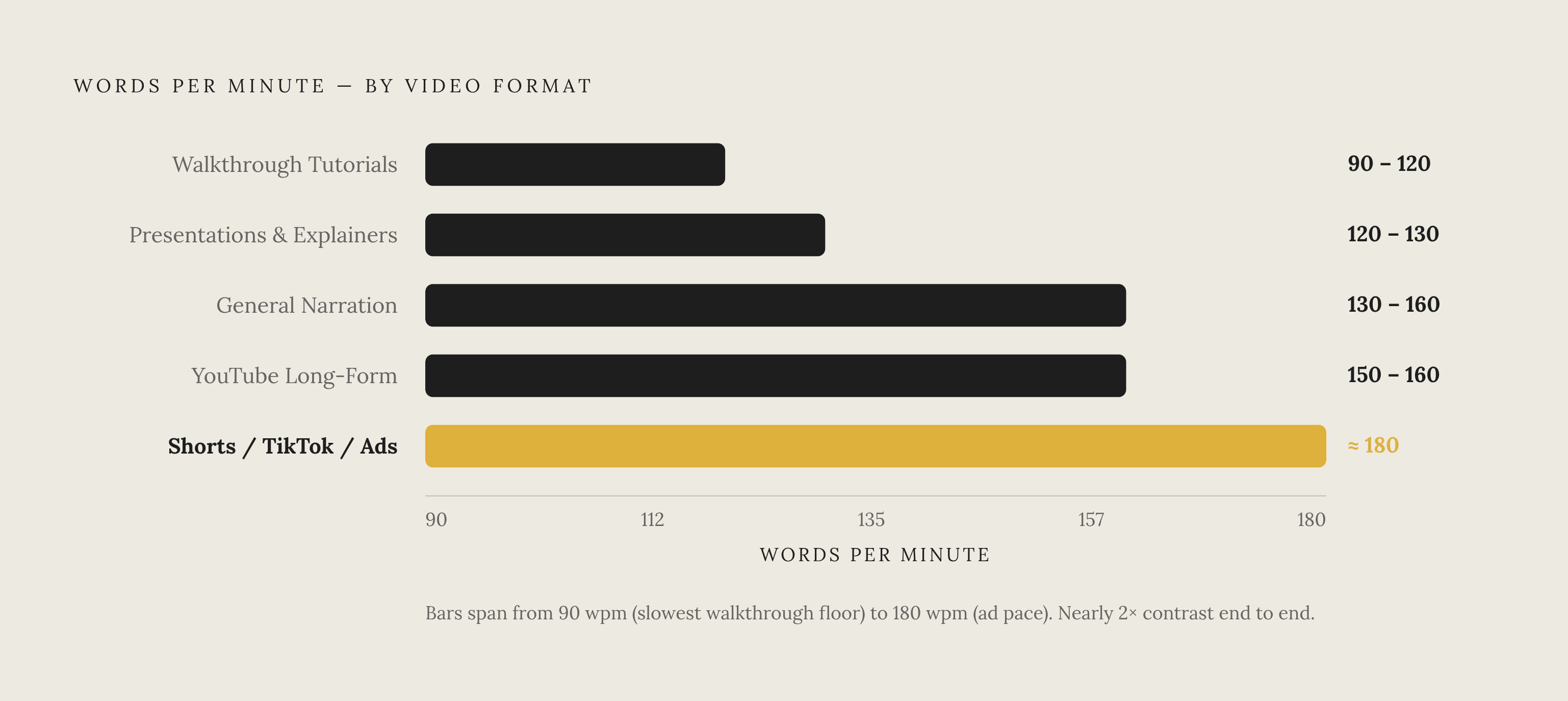
Software walkthroughs need to move slower than almost every other kind of video, and treating a tutorial script like a YouTube explainer or a paid ad script is one of the most common mistakes a writer can make. General video narration runs 130 to 160 words per minute, with 150 wpm serving as the number most scriptwriters default to when they don't have a format-specific reason to deviate. From there, the targets split by format. Presentations and explainers slow down further, to roughly 120 to 130 wpm, which keeps the pacing focused on clarity rather than momentum. YouTube long-form content sits close to the general baseline, at 150 to 160 wpm. Shorts, TikTok clips, and paid ads run faster still, closer to 180 wpm, because that format rewards energy and speed over careful explanation. Walkthrough tutorials are at the opposite end of that spectrum, at 90 to 120 wpm, a pace that researchers describe as steady and clearly segmented rather than brisk. That gap, 180 wpm for an ad against 90 to 120 wpm for a walkthrough, is close to double the speed, and it's the clearest evidence that tutorial pacing isn't just slower-than-average video pacing: it's a different register built around a different job, giving the viewer time to watch the screen, not just listen to a voice. The arithmetic that follows from these targets is simple enough to run before a single frame is shot: divide the script's word count by 150, and the result is the approximate runtime. A three-minute training video, run through that formula, converts directly into a word-count ceiling a writer can check a draft against before anyone presses record.
Over-scripting and tutorial pacing before recording
Once the word-per-minute target is set, the next failure point is simpler and far more common: scripts that are just too long for the slot they're meant to fill. Writers tend to over-script by 20 to 30% above what the format can actually hold, and that extra padding is one of the biggest drivers of pacing collapse and lost viewers. A format-by-format word-count table, like the one in ChatCut's 2026 script guide, turns that risk into something a writer can check mechanically rather than by feel. A tutorial sitting inside its standard length range has a word-count ceiling set directly by the 150 wpm rule, and any draft that runs past that ceiling will feel rushed or crowded no matter how well it's delivered on camera. The formula works as a production control, not an after-the-fact fix. If a subject-matter expert hands over a 900-word script for what's supposed to be a quick overview, the writer already knows, before recording starts, that it won't behave like a short piece once it's on screen. That early warning is the whole value of the check: catching the mismatch on the page is cheap, catching it in the edit bay after a shoot is not.
Pause length and information load limits: the two density levers writers underestimate
Getting the total word count right solves one problem but leaves another untouched: how the information is spaced out inside the script. Software walkthrough tutorials require a meaningfully slower pace than other video formats, and conflating the two is one of the most common scripting errors teams make. Inserting a 1.5-second pause right before a critical point or action step measurably boosts how much the viewer recalls afterward, because the silence itself signals that something important is coming and gives the screen time to catch up with the narration. On-screen text that echoes the spoken words compounds that effect: captions or callouts that reinforce the narration can lift retention by 37% in Macworld A/B tests, because the visual confirmation slows the perceived pace and locks the instruction in place. The second lever is information load per scene. Tutorials and microlearning segments work best when each scene carries exactly one task, one behavior, or one decision, nothing more. The moment a scene starts stacking in extra context, exceptions, and reminders, the viewer has to start sorting information instead of simply absorbing it, and that sorting cost appears in the scene itself regardless of how carefully the words-per-minute target was hit. A lot of corporate tutorials stop after "Tell": they state the rule, cut to a screen recording, and assume the viewer has absorbed it. That assumption usually doesn't hold, because stating a rule and showing a screen aren't the same as giving the viewer a bounded moment to actually process what just happened before the next instruction arrives. The practical fix is a sequencing discipline: name the action first, then explain the consequence of skipping it. A line like "open the settings panel first, because the rest of this method won't work without it" bounds the scene and gives the viewer a single, ordered thing to track. An opener like "before we begin, let's talk about the importance of understanding the broader context" does the opposite: it delays the action and front-loads the kind of unscoped context that causes the sorting problem in the first place.
Video length ceilings by tutorial type
Word-per-minute targets and scene-level load limits both feed into a bigger question: how long should the whole video run before it should be split into a series instead. ChatCut's 2026 guide sets the standalone tutorial length at 3 to 10 minutes. Beyond that ceiling, the problem is no longer density within the script but a mismatch between the format and what it's being asked to hold, and no amount of tightening the word count can fix that mismatch on its own. Asana Academy's structure shows what the alternative looks like in practice. Rather than building one long, comprehensive video that tries to serve everyone, Asana scopes its tutorials to the audience's readiness level: getting-started modules for new users run short, with completion-based progression that lets a learner move at their own speed; project planning tutorials are built separately for team leads; and administrator certification, including governance material, is scoped on its own for admins.
The hook window and the pacing contract with the viewer
Everything said so far about words per minute, pause placement, and scene length gets tested immediately, in the first few seconds of the video, because that's where the viewer decides whether the pace on offer matches what they came for. A large share of viewers drop off within the first 10 seconds: they clicked because the title promised something, and if the opening doesn't confirm fast that the promise is being kept, they leave. For a software tutorial, the opening line that works best states the outcome directly: something close to "by the end of this video, you'll know how to do X without running into Y problem." That kind of line tells the viewer what density and pace to expect for the rest of the video, with nothing left for them to sort out on their own. An opener that leads with social pleasantries before getting to the value, the familiar "hey guys, welcome back" pattern, does real damage here, because it teaches the viewer in the first few seconds that this video runs at low density, which makes early drop-off more likely rather than less. The practical discipline that follows from this is to write three different hook options before filming starts, then pick the one that states the clearest outcome using the fewest words. Tension and curiosity are useful tools in YouTube long-form storytelling, but for a software walkthrough, clarity and specificity beat suspense every time. The hook is the first and most immediate proof of whether the pacing standards covered here were actually followed, not a separate creative exercise bolted onto the front of the script.