Audio Quality Benchmarks for Software Training Videos
Four measurable audio benchmarks that training videos can't skip.

Software training videos live or die on audio, and most teams don't have a number to aim for. They know a video "sounds off" without knowing why, or what to fix. This piece gives four concrete benchmarks: noise floor, loudness level, peak headroom, and voiceover consistency, each one tied to something you can measure on a meter, not just something you can sense in your gut.
Hearing does more of the work in learning than most producers assume. Research cited by Trafera puts hearing's contribution to comprehension at 60 to 75%, with seeing contributing 25 to 40% depending on how complex the material is. Audio functions as a core element that carries meaning alongside the visuals. It's closer to the main channel, and treating it as an afterthought shows up in the data.
Research.com data found 83% of employees prefer video over text or audio for training, and video-based training produces 95% retention compared to 10% for text. Those numbers assume something, though: that the audio is actually usable. A screen recording with a hissing noise floor, or a voiceover that clips on every third word, doesn't get to claim that 95% figure. It gets whatever a distracted, straining learner actually retains, which is a lot less. Teams chasing video output without fixing audio are quietly throwing away the exact advantage that made video worth producing in the first place.
What "professional audio" actually means in measurable terms
The AudioMOS Challenge 2025 broke audio quality into four separate dimensions, borrowed from Meta's Audiobox Aesthetics framework. Production Quality asks whether the recording itself is clean. Production Complexity asks how layered or busy the audio scene is. Content Enjoyment asks whether it's pleasant to listen to. Content Usefulness asks whether it does the job it's supposed to do.
The first two are objective, measurable properties of the signal. The last two lean subjective, closer to opinion than measurement.
For a software training video, two of these four matter more than the others: Production Quality and Content Usefulness. Everything else is secondary. A clean signal, paired with content that actually helps the learner do the task in front of them, is the whole target, not the enjoyment score, not how busy the mix sounds.
Four things fall out of this that a non-specialist team can control without hiring an audio engineer:
- Noise floor
- Loudness level
- Peak headroom
- Voiceover consistency
None of these are audiophile-tier concerns reserved for podcast studios or music mixing. They're the floor. Miss any one of them and comprehension drops, no matter how good the screen recording or script underneath it is.
The loudness target: why -14 to -16 LUFS is the right destination for dialogue-heavy content
LUFS and LKFS measure the same thing. Two names, one number, both showing up in export menus depending on which software a team uses. Don't let the label switch cause confusion mid-project. They're the same K-weighted loudness measurement wearing two different name tags.
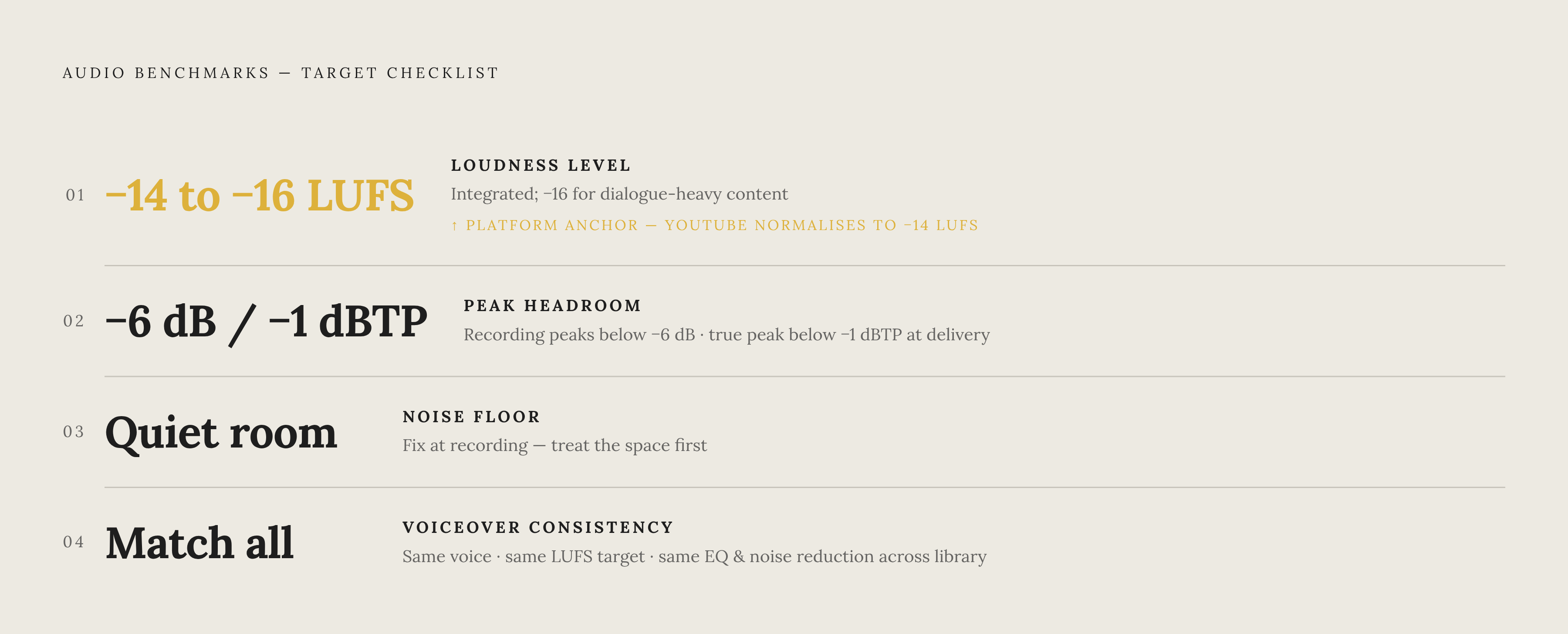
YouTube normalizes uploaded audio to -14 LUFS integrated loudness. For dialogue-heavy training content, the target range sits at -14 to -16 LUFS, and -16 is often the better landing spot, specifically for spoken word. Music mixes get pushed loud and compressed hard to compete for attention. Speech doesn't need that treatment. Compress it that hard and you flatten the natural rhythm of a person talking, the pauses and emphasis that help a listener follow an explanation. Sitting a couple of LUFS below the platform's ceiling keeps that rhythm intact.
True peak is the other half of the equation, and it needs to stay below -1 dBTP. This isn't a stylistic choice, it's a hard ceiling: platforms re-encode audio after upload, and peaks too close to 0 dBTP get pushed over the edge during that re-encode, producing distortion the original file never had.
Cross-platform distribution complicates things slightly. Informal testing documented by Veniamastering Studio in 2026 found TikTok and Instagram normalize to somewhere around -14 to -15 LUFS. Practically, that means a single target of -14 to -16 LUFS works as a safe universal setting whether the training content lives on YouTube, gets clipped for social, or sits inside an internal learning platform.
One workflow note that trips teams up constantly: LUFS is measured as an integrated value across the entire file, not a momentary spike. A level meter watching for peaks won't tell you your integrated loudness. That requires an actual loudness meter, built into most modern editing software but easy to skip if nobody on the team knows to look for it.
There's a discoverability angle here too. YouTube's ranking signals lean heavily on watch time and engagement. Audio that's too quiet, too harsh, or inconsistent in level pushes viewers to bail early or turn down the volume and stop paying attention, and that behavior feeds back into the algorithm as a weaker signal. Bad audio doesn't just cost comprehension. It costs reach too, quietly, in a way nobody traces back to the mix.
Noise floor and peak headroom: the two recording decisions that can't be fixed in post
Background noise is the single most common audio failure in training videos recorded outside a proper studio: a hum from a climate-control vent, a keyboard clatter, traffic bleeding through a window. It reads as unprofessional instantly, and it pulls attention away from the content in a way that compounds over a 10-minute video.
Most teams get the fix order backwards. They record wherever's convenient, then try to clean it up with noise reduction, then blame the equipment when it still sounds bad. Flip that order. Record in a quiet room first. Apply noise reduction conservatively second. Upgrade equipment third, if at all. Reduction tools work by guessing what's noise and subtracting it, and when they're asked to clean up a genuinely noisy recording, they introduce their own artifacts: a warbly, underwater quality that's often worse than the original hum. Fixing the room beats fixing the file every time, and no plugin reverses that math.
Clipping is the other recording-stage failure that can't be undone later. Once a peak exceeds the recording headroom, the waveform gets flattened at the top, and that flattening reads as a harsh, crackling distortion no software can fully restore. The practical target during capture: keep peaks below -6 dB, leaving enough headroom for whatever processing happens in post. Getting there means proper gain staging across the whole signal chain, from microphone input through to the recording software's input level, not just cranking a single volume slider until it looks right on a meter.
Consistency across a series matters as much as any single video's quality. A training library where episode one sounds crisp and episode eight sounds thin and roomy reads as unprofessional even if every individual video would pass on its own. The fix is a recording checklist covering environment, gain setting, and equipment that every team member follows regardless of who's behind the mic that day. Templates do more work here than raw skill ever will.
The QualiSpeech dataset, built by researchers at Tsinghua University and ByteDance and published at ACL 2025, mapped out 11 distinct low-level speech quality dimensions. Among the failure modes documented in the annotated samples: background noise, distortion, and continuity issues. All three start at the recording stage. None of them get fixed reliably in an edit, no matter how skilled the editor is.
Voiceover consistency: the benchmark that applies whether a human or AI is narrating
A library where every video sounds slightly different is a distinct problem from any one video sounding bad. Different rooms, different speakers, different equipment on different days: it all signals ad-hoc production rather than a maintained standard, and learners notice even when they can't name what's off.
Human voices still carry a preference edge. Available data finds 70% of people prefer a human voice over a robotic one, a relevant data point for any team weighing recorded narration against AI voiceover. It's also part of why AI voice quality has pushed so hard toward lifelike, natural delivery. The gap that mattered five years ago is closing fast.
A training library holding to a real consistency standard needs to match on four fronts:
- Same loudness target across every video, such as -14 to -16 LUFS if publishing to YouTube
- Same voice, accent, and pacing, or a documented, approved set if multiple voices are used
- Same EQ and noise reduction settings applied at export
- Same silence handling at the start and end of every clip
AI narration changes the math on all four, and this is where most teams underrate what's actually on offer. By definition, it produces consistent output across every video: no bad-room-day, no speaker catching a cold mid-project, no re-recording session because a script line changed. That last point matters more than it sounds like it should. Training content isn't static. Policies update, product UI changes, internal workflows shift, and every one of those changes used to mean dragging a human narrator back into a recording session. Re-recording human voiceover every time content changes is the consistency failure most teams don't see coming until the library has grown past the point where it's easy to manage.
The real benchmark is whether the audio holds up across the whole batch, not just video one next to video two. It's whether video 47 still sounds like it came from the same production standard as video one. The workflow question, not the recording question, is the one most teams fail quietly.
How AI-assisted production tools make these benchmarks reachable for non-specialist teams
Traditional production timelines for a single 5-minute training video run 2 to 3 days: a full day on scripting and planning, half a day recording, a full day editing and finalizing. Professional production costs run $1,000 to $3,000 per finished minute, which puts a 10-minute series somewhere between $10,000 and $30,000. For a team that needs dozens of these videos, that math doesn't scale, and it's usually the first budget line cut when someone asks why training content takes so long to ship.
Industry data from 2026 shows organizations using AI-powered video creation producing training content roughly 11 times faster than traditional methods. That speed gain shows up directly in the audio workflow, not just in editing time:
- Voiceover generation, which removes the recording environment as a variable entirely
- Loudness normalization applied automatically to delivery targets
- Automated captioning that stays synced to the audio track
- Noise isolation and denoising running on edge AI, now standard in enterprise platforms according to a 2025 audio and video industry review
That 2025 review, from TestDevLab, marks a real shift: AI moved from being a bolt-on feature to embedded infrastructure. Cisco's Webex RoomOS 26 shipped advanced noise isolation. NVIDIA's Maxine SDK R14 was released in April 2025 with updated capabilities. Denoising has become a standard, expected part of the process. It's baseline, the way spell-check is baseline in a word processor.
Platforms in this space split roughly into two camps. Some combine voiceover generation with structured course authoring, Easygenerator's EasyVideo is one example, folding video creation directly into course-building workflows. Others focus on standalone AI video production built around avatars and voiceover options, with Colossyan notable for supporting multilingual video creation and fast updates when source content changes.
For software explainer content specifically, the more useful category is platforms built around screen recording paired with script rewriting, lifelike voiceover, smart zoom, captions, and article generation, all inside one workflow. The value lies in the whole batch coming out polished. It's that the benchmarks stop being something a producer manages by hand at every step, and become something the workflow enforces automatically, video after video, without drift.
A tool that produces one great video isn't solving the actual problem. A tool that produces two hundred consistent ones is, and that distinction is the whole argument for building audio standards into the workflow instead of into someone's personal checklist.
Putting the benchmarks into a production checklist teams can actually use
None of this works as an after-the-fact quality check. It has to run as a pre-flight standard, applied before a video ships, not a rubric pulled out after someone complains it sounds off.
Capture benchmarks:
- Record in the quietest environment available. Treat this as non-negotiable, not something to improve "when there's time."
- Keep recording peaks well below 0 dB to preserve headroom for post-processing.
- Use the same equipment and gain settings across every video in a series.
Delivery benchmarks:
- Integrated loudness between -14 and -16 LUFS, leaning toward -16 for dialogue-heavy content.
- True peak kept safely below 0 dBTP to avoid distortion during platform re-encoding.
- Measure with an actual loudness meter, not a level meter, since the number has to be integrated across the full file.
Consistency benchmarks:
- One voice, one loudness target, one set of noise reduction settings, applied identically across the whole library.
- Write the standard down. Anyone producing a new video should be able to inherit it without asking around.
- When content changes and a video needs an update, the revision workflow has to preserve audio consistency, not just get the script right.
The AudioMOS framework's four dimensions remain a useful reference here. Production Quality and Content Usefulness are worth treating as two separate questions. Is the signal clean? And separately, does it actually serve what the learner is trying to do? A video can pass the first test and still fail the second, if pacing drags or the explanation loses the thread partway through.
Ten videos with strong audio is a nice start. A hundred videos that all sound like they came from the same disciplined process is the actual benchmark, the line that separates teams who treat audio as a workflow standard from teams still hoping it "sounds fine" on a case-by-case basis.