Revision Cycle Costs in Training Video Production
Hidden revision costs and delays compound across nine production stages.
The invoice a vendor sends for a training video never tells the whole story. Revision cycles, the rounds of feedback, edits, and re-approvals that happen after that invoice gets paid, are where the real budget hides. A single stakeholder review can trigger labor, delays, and rebilling that dwarf the original quote, and most L&D teams find this out only after the check has cleared.
Cost compounding across the nine stages of a video's life
Production runs as a chain: needs analysis, scripting, storyboarding, recording, editing, SME review, accessibility checks, LMS upload, and scheduled updates. Nine handoffs, and every unclear one pulls a specialist back into work they thought was already finished.
Split the costs into two buckets. Direct costs appear on the invoice: the production quote, software licenses, equipment rental, voice talent. Hidden costs live in the calendar instead: SME prep and review hours, script and storyboard rewrites, stakeholder approval rounds, caption and localization updates, republishing after content changes.
Instructional design sits almost entirely in that second bucket. It's the thinking that happens before a camera ever turns on, and industry estimates put it at 15% to 25% of total budget, even though it rarely appears as its own line item. The Chapman Alliance found that producing one finished hour of basic Level 1 e-learning takes roughly 79 hours of work. Filming is the fast part. Planning is where the hours go, and most budget approvers never see that math until the invoice explains it to them.
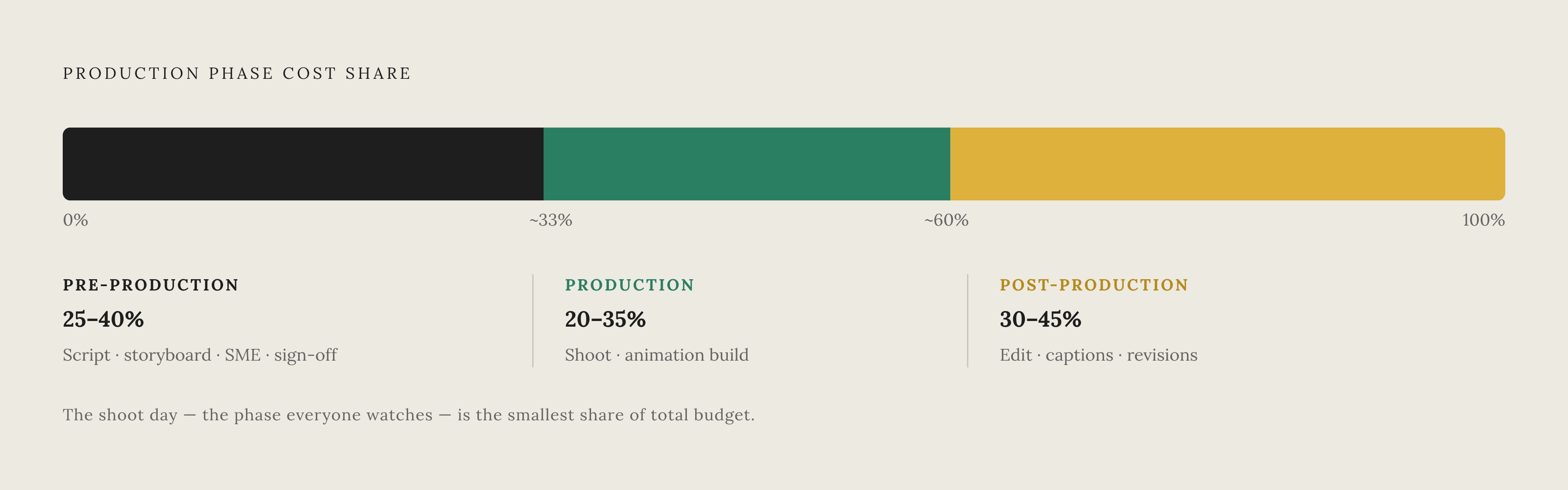
Broken down by phase: pre-production (scripting, storyboarding, SME interviews, sign-off) runs 25% to 40% of total cost. Production, the actual shoot or animation build, runs 20% to 35%. Post-production, including editing, captions, and revision rounds, runs 30% to 45%. The shoot day is usually the cheapest of the three, even though everyone assumes it is the most expensive. Budget approvers watch the camera roll and assume that's where the money went. It is usually the cheapest of the three, because the money goes into the rounds nobody watches happen instead. The money goes into the rounds nobody watches happen.
Revision round costs per round and why they multiply
Most agency contracts bake in one or two revision rounds. Anything past that bills separately, usually $500 to $2,000 per additional round. Blow past the contracted count after editing has already started, and total project cost can climb another 10% to 20%.
Revisions rarely land as one clean pass. Marketing signs off, then legal flags a concern, then a VP asks for the opening to be reshot. Each of those is a separate billable event, not a continuation of the last one, because each one reopens work that had already been closed and handed off.
Unstructured review is the real inflator. Duplicate comments, conflicting priorities from different stakeholders, requests that never specify what "fix this" actually means: all of it adds rounds that shouldn't exist. A single vague note left in an email thread, something like "this part feels off," can reactivate an SME, an editor, an accessibility reviewer, and a project manager all at once, over one unclear frame of footage.
Lock the script before production starts, and get every stakeholder to sign off on the storyboard. That's the highest-leverage moment in the whole workflow, because changes there are still free. Changing a sentence in a Google Doc costs minutes. Changing the same idea after animation is built costs days, plus another full review cycle. Every informal "just a small tweak" that skips the storyboard stage is a deferred invoice, one that hasn't arrived yet.
Content categories that generate far more revision debt than others
Not all training content ages the same way, and update frequency is the single biggest variable when comparing long-term costs across content types.
Software walkthroughs sit at the top of the risk list. A renamed field or a moved menu item breaks the video instantly, and that one interface change cascades into script revision, new narration, another stakeholder review, and republishing. Compliance training carries its own version of the problem: policy language changes trigger full re-records, and legal sign-off adds a review layer that raises the scripting bar, since the video has to stay accurate for years, not months. Onboarding content updates at a moderate pace, tied to role changes and new tools, on a less urgent clock than the other two.
Manager coaching content tends to stay evergreen. Safety and product training update on a predictable schedule. Software walkthroughs don't get that luxury, and plenty of organizations let these videos go stale simply because updating them costs too much. That leaves learners following outdated steps and trainers fielding the same confused questions the video was supposed to eliminate.
Compliance adds its own multiplier on top of standard revisions, since legal review isn't optional. The footage itself isn't more complex, but each cycle pulls in more specialists, and specialists cost more per hour than editors alone.
Map expected revision frequency by content category before picking a production approach. Doing it after the first update request lands means doing it under pressure, with a deadline already ticking.
How a single update request becomes a six-week delay
A single five-minute training video, produced the traditional way, breaks down roughly like this: scripting takes 3 to 5 days, recording 1 to 2 days, editing 5 to 10 days, voiceover recording and sync 2 to 3 days, with additional rounds for revisions on top of that. Total effort across specialists: 40 to 60 hours.
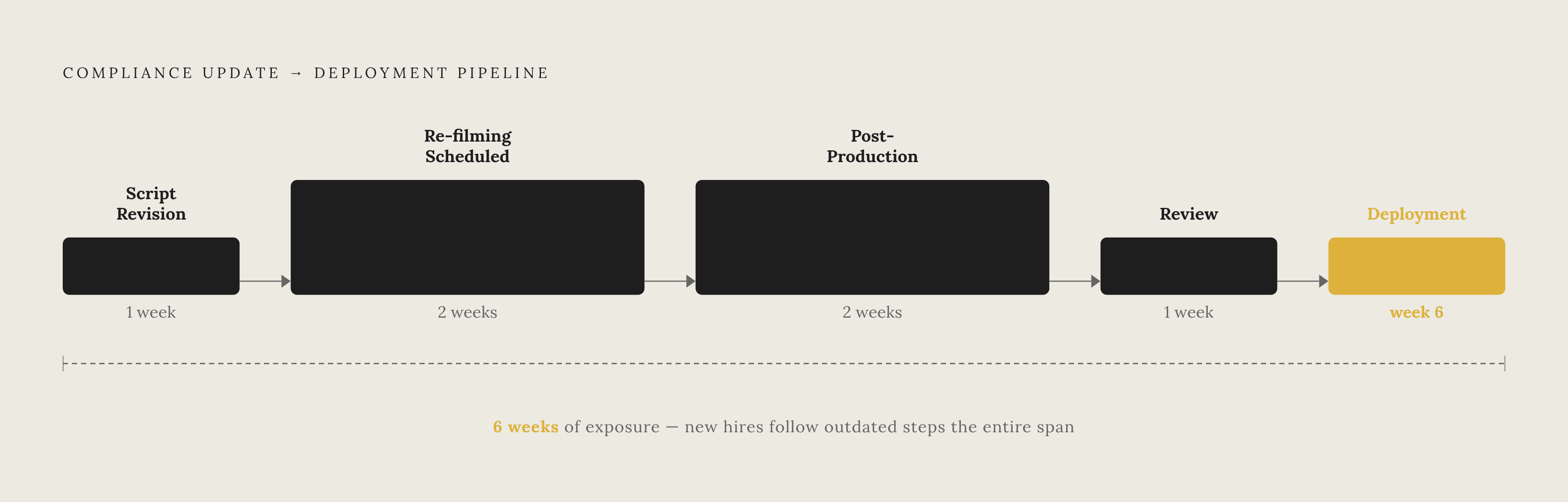
Now update that video for a compliance change. Script revision eats a week. Re-filming gets scheduled two weeks out, because that's when the room and the presenter are both free. Post-production takes another two weeks. Review adds a week. Then deployment. One update request turns into a six-week delay before anyone sees the corrected version.
During those six weeks, new hires keep following outdated steps. Compliance exposure stays live the whole time. Trainers answer the same questions over and over, the exact questions the video was supposed to make unnecessary. That's operational risk sitting on the clock, not just a budget line, and the timeline itself belongs in the total cost of ownership, not just the dollar figure.
The delay is structural. Nothing about better project management fixes a pipeline that requires reshoots. The production approach itself changes the outcome, not tighter scheduling.
Production approach choices that reduce revision cost before the first update arrives
Modular production breaks one long video into pieces. Instead of a single 30-minute training video, produce six five-minute modules. When policy changes, reshoot the one module affected, not the other five.
Batching helps too. Producing a series together in one production cycle saves on crew, studio time, talent booking, and post-production setup, often 20% to 30% in total savings for organizations that plan ahead this way.
Animation deserves a specific mention as a long-term hedge. It costs more upfront, but it can cut long-term update expenses by 30% to 50% compared to live-action, since most content changes only require a design revision, not a reshoot. That math favors animation for abstract concepts, data visualizations, and process diagrams, things that couldn't be filmed in the first place, especially when the content updates often enough that skipping reshoots pays back the premium.
Animation stops making sense for software walkthroughs. These change faster than any other category, and if the underlying UI shifts fundamentally, a design revision can take just as long as a reshoot would have.
Music and stock footage licensing runs $200 to $2,000 per project, and content updates triggered by product or policy changes run $2,000 to $5,000 each. Modular and batched approaches shrink both, since fewer full rebuilds means less licensing and fewer from-scratch update cycles.
Storyboard sign-off is still the cheapest insurance in the whole process. Catch a structural problem there, and it costs nothing to fix. Catch the same problem after production has run, and it costs credits, time, and a full stakeholder review cycle all over again.
What AI-assisted production changes about the revision cost model
Traditional production requires specialized skills: video editing, audio engineering, graphic design, instructional design, skills most L&D and customer education teams don't have sitting in-house. Every update gets queued and routed back out to whoever holds that skill, and the queue is where delays live.
AI-assisted tools remove the bottleneck by removing the skills requirement itself. Some platforms take the process from raw recording to a publishable video in 5 to 10 minutes, roughly an 11x speed improvement over the traditional pipeline. Cost compresses right alongside speed: AI video platforms can collapse traditional per-minute production costs by 80% or more, which makes it realistic to keep content current instead of letting it go stale.
Teams using these tools report producing 5 to 10 times more content with the same headcount and the same budget. The bottleneck moves. Speed of production is no longer the constraint; because these tools cut production time, speed of deciding what needs to change is now the limiting factor.
What actually disappears from the revision cycle: script cleanup, since generative AI can revise narration without a rerecording session. Voiceover, since AI voices skip the scheduling lag of booking talent. Zooms, captions, and lower-thirds, automated instead of manually redone with every update. Localization, which turns into a one-click language generation step instead of a separate translation project with its own timeline.
In an AI-assisted workflow, a UI change triggers a script edit and a new render. It doesn't trigger a six-week pipeline restart. Business interest in AI video creation surged 210% year-over-year, as companies look for a way to produce training content that doesn't outpace their own budget to maintain it.
AI tools built for training and software education content
A handful of platforms have built specifically around the training and software education use case, and they differ in what they optimize for.
Some generate video using AI avatars that read a script aloud in 120+ languages, aimed at consistent, presenter-led training and onboarding content, with adoption reportedly crossing 50,000 teams by 2026. Others take a different route: multilingual platforms supporting 92 languages, with 200-plus AI avatars, version control, and analytics built specifically for localization workflows at scale.
Full-workspace platforms cover the entire chain in one place: image generation, storyboarding, video generation, audio integration, timeline editing, and export, so a team never has to hop between five separate tools to finish one video.
For software education and SOP work specifically, the sharpest category is AI platforms built around screen-recording-to-polished-video. These take a raw screen capture, apply AI script rewriting, generate a lifelike voiceover, add smart zoom and captions automatically, and produce accompanying documentation alongside the video itself, tools like Clueso, an AI platform that turns raw screen recordings into polished product videos and step-by-step documentation in minutes, purpose-built for software teams. Script, voice, and visuals stay editable in a single pass, without needing an editor, a voice actor, and a project manager to coordinate three separate calendars. That combination is what actually collapses the revision cycle, not just speed for its own sake.
Four questions determine how well a tool fits real production needs, affecting cost, workflow, and output quality. Does it handle video and documentation in one workflow, or do they stay separate? How many languages does localization cover, and is that one step or its own side project? Does version control let a team update existing content, or does every change mean rebuilding from zero? And can someone on the customer success or L&D team run it independently, without pulling in a specialist?
Building a total cost of ownership model for training video decisions
A real TCO model includes line items that never appear on a production quote: needs analysis and scripting labor, SME hours (loaded hourly rate multiplied by every hour spent planning, reviewing, and correcting), stakeholder approval rounds, accessibility work (captions, transcripts, audio description), localization priced per language version, hosting and platform fees ($50 to $500 a month), future update cost modeled by category and how often that category actually changes, and learner time lost to stale or inaccurate material, a cost that rarely gets counted but is real all the same.
For each hidden line item, write down an hourly rate, expected hours per cycle, how often that cycle repeats, and a named owner. If there is no named owner, the cost stays invisible until a budget review forces the question, usually at the worst possible moment.
Before choosing a production approach, ask one question: how often will this content change, and who has to make that change, on what timeline? Low-change, high-polish content, an executive welcome video, a brand overview, justifies a traditional agency approach or a full animation build. Budget for one or two revision rounds and a long gap between updates.
High-change content doesn't get that luxury. Software walkthroughs, compliance training, onboarding: these categories almost always win on total cost of ownership with in-house or AI-assisted production, once the true revision frequency gets modeled honestly instead of assumed away.