LMS and Hosting Cost Structures for Training Video Libraries
Storage and bandwidth charges hide outside every LMS pricing model.

A training team signs a contract, starts uploading its video library, and within a few months hits a wall nobody mentioned during the sales call: a storage cap, an overage fee, a bill that doesn't match the number on the proposal. This happens constantly, and it happens for a structural reason, not because anyone made a careless mistake. The pricing models that dominate the learning management system market were built around user counts and feature tiers, not around the size or weight of the content sitting inside the platform. A per-user rate or a flat monthly plan tells a buyer what it costs to open the door for a given number of learners, but it says nothing about what it costs to store and stream the video itself, and that gap is exactly where video-heavy teams get caught. The mismatch becomes visible once the team has already picked a platform and built a production schedule around it, leaving little room to renegotiate. Understanding why this happens means looking past the headline number and at how each pricing model decides what counts as "included."
How the four main LMS pricing models distribute cost risk differently
Four pricing models cover most of the market in 2026, and each one puts a different kind of risk on the buyer rather than the vendor. Pay-per-registered-user pricing charges for every account a team sets up, whether or not that person ever logs in, so billing is predictable but a company pays for every seat it creates, used or not. Pay-per-active-user pricing only charges for people who actually log in or complete training during a billing period, which can save real money for a workforce that's seasonal or has a lot of turnover, but it's harder to budget for in advance, and the rate charged per active user tends to run higher than the per-registered-user rate. Flat-fee or seat-band licensing charges one annual or multi-year fee for a defined band of users, typically $5,000–$75,000+ per year depending on tier and cap. This model works well for a team that expects to grow its training usage without growing its headcount, but a small team can end up paying a minimum fee that's higher than what a per-user plan would have cost. Open-source or self-hosted platforms carry no license fee at all, but the team running one has to cover hosting, maintenance, security patches, plugin upkeep, and the staff time to manage all of it, and that adds up to real operating costs that can still run in the thousands of dollars a year. None of these four models, whatever their differences, puts a price on storage or bandwidth anywhere in the headline number. That's the gap a video-heavy library runs straight into.
Hidden Costs in Video Libraries
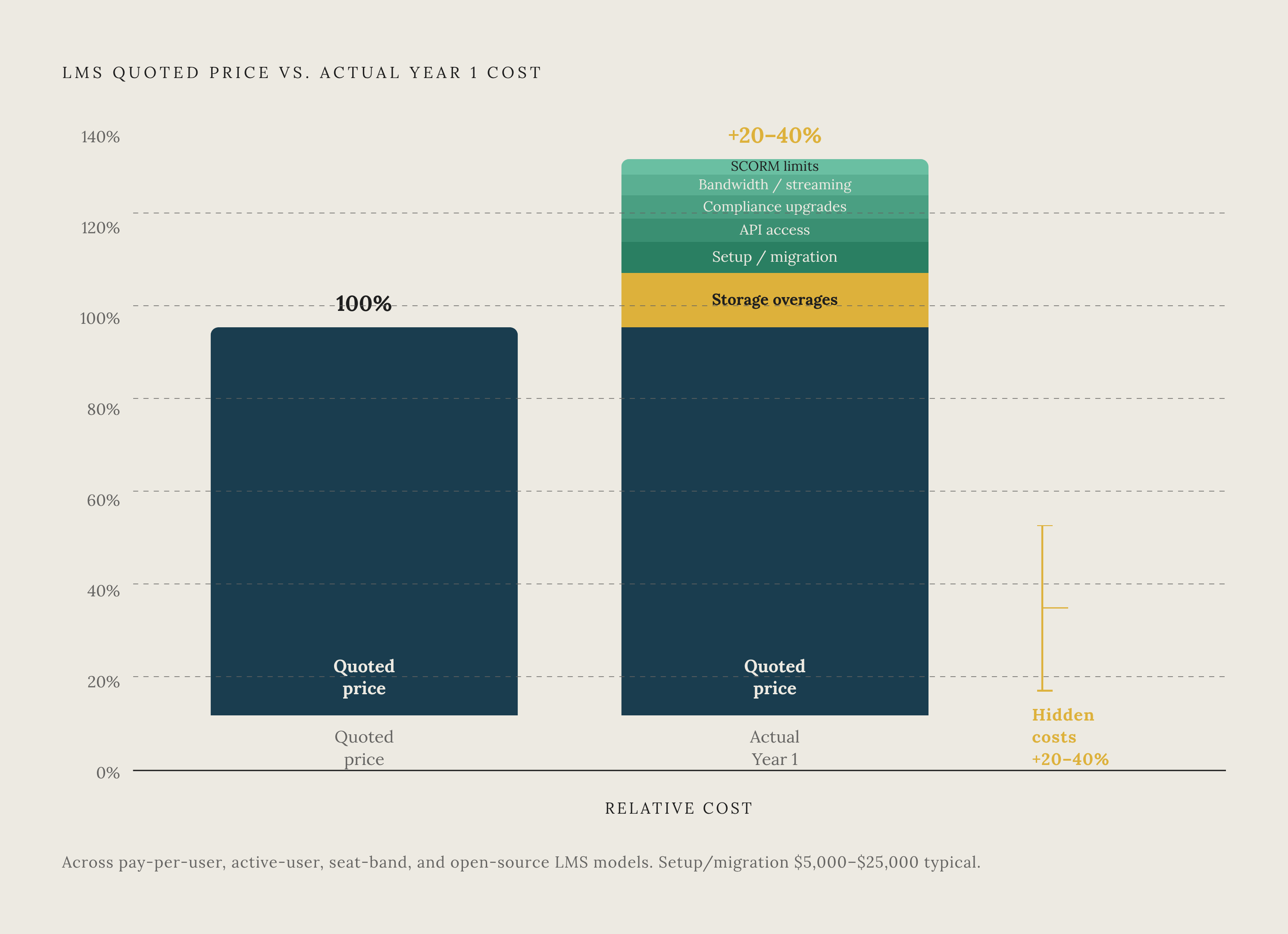
Storage and bandwidth sit outside the user-count logic that defines every one of the four pricing models above, and that's exactly where video-heavy buyers get surprised. A plan quoted at a flat monthly rate or a per-user rate is quoting access to the platform. It is not quoting the cost of hosting the gigabytes of video sitting inside it. Picture a mid-size company building a 50-video onboarding library, with each video running a typical length for HD training content. That library can easily land in the range where a base-tier storage allocation gets used up fast, and once a plan's storage cap is hit, every additional gigabyte carries its own charge. Several costs beyond raw storage usually sit outside the quoted subscription too. Bandwidth or streaming fees apply when learners actually play the videos, and that cost multiplies for large, distributed teams, since simultaneous playback across time zones adds up fast. SCORM or content package upload limits cap how many training modules a given tier can hold, regardless of how much raw storage space is left. And some organizations end up paying API access charges just to connect their LMS to an outside video hosting service, because the platform's native storage can't handle the library they built. A 2026 guide from Danfe puts a number on how big this problem gets in aggregate: unplanned expenses inflate training budgets by 20 to 40 percent, and for video-heavy deployments, storage overages are the single biggest piece of that range. None of this requires naming a specific vendor to understand. It's a structural feature of how the market prices access separately from content weight, and it applies across platforms.
Total Cost of Ownership for Video, Setup, and Ongoing Fees
Building an honest total cost of ownership estimate means adding several categories most buyers don't ask about until after they sign. Year 1 almost always costs more than later renewal years, because setup and migration are one-time charges folded into that first invoice. Vector Solutions notes that the subscription fee itself typically covers only about half to sixty percent of what an organization actually spends in Year 1. Migration adds its own cost, and how much depends heavily on what a team is migrating from. Growth Engineering puts setup fees for a SaaS LMS at $5,000–$25,000 depending on configuration complexity, with enterprise deployments involving SSO, custom integrations, and multi-site rollouts pushing toward the top of that range. Vector Solutions points out that a large share of buyers are moving off of no structured system at all, or off of general-purpose tools like shared drives or collaboration software, and both situations bring more change-management work than a clean move from one LMS to another. Compliance features like audit trails, certification tracking, and regulatory reporting are usually locked behind mid-tier or enterprise pricing rather than included in the base plan, so a team in a regulated industry needs to build that into the budget from the start rather than discover it later. Multi-year contracts often lower the per-period rate, but they tend to come with renewal escalators, so a buyer should ask a vendor to write the renewal cap into the contract language before signing anything, Growth Engineering notes. And a third-party content library like LinkedIn Learning, Go1, Skillsoft, or OpenSesame is a separate ongoing cost altogether. The LMS is the framework the content sits inside, but adding an off-the-shelf library on top of it is its own subscription, often running a five- or six-figure annual commitment on its own.
How open-source and self-hosted options redistribute rather than eliminate these costs
A common response to all of this is to skip the vendor relationship entirely and run an open-source LMS instead. That move doesn't make the hidden costs of video hosting disappear. It moves them from a vendor's invoice onto internal labor, infrastructure, and IT staff time, where they're harder to track but no less expensive. Hosting video on a self-managed platform does hand a team direct control over its own storage limits, since nobody else sets the cap. But that control comes with the responsibility to provision, monitor, and scale that server capacity, which is a real burden for an L&D team that doesn't have dedicated IT support sitting behind it. The claim that open-source saves money holds up only when the technical staff needed to run it are already on payroll for other reasons. A team that would need to hire or contract specifically to maintain an LMS should model that cost directly against a comparable SaaS subscription before assuming the open-source path is cheaper.
Video Production and Hosting Costs in Per-Learner Economics
The real cost per learner comes from two numbers multiplied together: what it costs to produce each video, and what it costs to store and stream it afterward. Decisions made at the production stage set the hosting bill the library will carry for its entire life. Traditional video production, running $1,000 to $5,000 per finished minute, created a trap that a lot of training libraries are still stuck in: the content that needed updating most often, because procedures or regulations changed, was also the most expensive to redo. A safety training video that cost a large sum to produce gets an addendum note stapled onto it instead of a full retake, because nobody wants to pay full production cost twice. AI-assisted production is changing that math from two directions at once. Cost per video has dropped sharply, since a short training video that once took many hours of production time now takes a fraction of that using AI-assisted pipelines. And shorter, more modular videos, which this kind of production naturally favors, generate smaller file sizes, which lowers the storage cost tied to each topic in the library. A separate production path is the document-to-video workflow, where existing SOPs, training manuals, or compliance documents get converted directly into video without a shoot day or an actor involved. Platforms built specifically for this purpose take PDFs, PowerPoints, and process documents and generate complete training videos from them. Both of these shifts mean the cost of producing a video and the cost of hosting it are no longer separate conversations. A production choice that shrinks file size also shrinks the recurring storage bill, every month, for as long as that video stays in the library.
Questions to put to any LMS vendor before signing a contract for a video-heavy library
The gap between a quoted price and the price a team actually pays closes before the contract gets signed, not after, and for a video-heavy library, most of the questions that close it are about storage and bandwidth rather than user counts. A buyer should ask what the storage cap is on the plan under discussion, and at what file size a standard HD training video starts counting against that cap, since the answer determines how many videos the base tier can actually hold. There's often a separate SCORM or content package upload limit that applies on top of the raw storage number, since a plan can have plenty of storage left and still hit a module cap. A buyer should also ask how the vendor defines an "active user," whether that's a login, a completed module, or something else, and get that definition written into the contract rather than left as a verbal assurance. A buyer should ask what the minimum seat requirement is and what headcount triggers the next pricing band, since that number often sits lower than a buyer expects. Compliance features deserve a direct question too: are audit trails, certification tracking, and regulatory reporting included at this tier, or gated behind an upgrade, and are every one of the add-on fees disclosed upfront, given that hidden costs can inflate LMS budgets by 20 to 40 percent according to industry analysis. A buyer locking in a multi-year term should ask for the renewal escalator cap in writing before signing anything. On the total cost of ownership side, it's worth asking what the setup fee includes and excludes, and whether it's charged as a fixed fee or billed time-and-materials, since that distinction alone can shift a Year 1 budget by thousands of dollars. And a buyer connecting the LMS to an outside video host to work around a storage cap should ask directly whether API access carries its own separate charge. None of these questions require distrust of any particular vendor. They require treating the headline price as a starting point for a conversation, not the final number a budget gets built on.